Do You Have to Reset the Car Key After a Battery Change
Changing the battery in your car key is a simple task, but the big question is whether you need to reset the key afterward. The short answer is: it depends on your car brand and model. Some vehicles require a full key fob reset after a car key battery swap, while others sync automatically. This guide walks you through everything you need to know about reprogramming your car key after a battery change, so you can get back on the road with confidence.
You just popped open your car key, swapped out the tiny battery inside, and closed it back up. But now the key fob does not work. You press the button, and nothing happens. Your heart sinks. Did you forget a step? Do you have to reset the car key after changing the battery? This is a question that frustrates car owners every single day, and the answer is not always straightforward. Let us break it all down for you in simple, easy-to-follow terms.
The truth is, whether you need to reset your car key after a battery change depends on several factors. Your car brand matters. Your key type matters. And sometimes, the situation simply does not require any reset at all. Understanding this process saves you time, money, and a lot of unnecessary stress at the dealership or mechanic shop.
In this article, we will cover everything from recognizing the signs that your key battery is dying, to step-by-step reset instructions for popular car brands, to tips that help you avoid common pitfalls. By the end, you will feel confident handling your car key battery replacement like a pro.
Key Takeaways
- Not all cars need a reset: Many modern vehicles sync automatically after you replace the key battery.
- Some brands require manual reprogramming: BMW, Audi, and certain other brands may need a reset procedure after a battery swap.
- Watch for warning signs: If your key fob stops responding, it is a clear signal that a reset or battery replacement is needed.
- Use the right battery: Always match the battery type to your key fob specifications to avoid issues.
- Avoid common mistakes: Touching the wrong buttons during the reset process can cause extra problems.
- Consult your owner manual: Your car manufacturer provides the most accurate reset instructions for your specific model.
📑 Table of Contents
- Understanding Your Car Key Battery
- Signs Your Car Key Battery Needs Replacement
- Do You Have to Reset the Car Key After a Battery Change?
- How to Reset Your Car Key After Battery Replacement
- Tips to Extend Your Car Key Battery Life
- Common Mistakes to Avoid After Changing Your Key Battery
- When to Seek Professional Help
- Frequently Asked Questions
- Final Thoughts
Understanding Your Car Key Battery
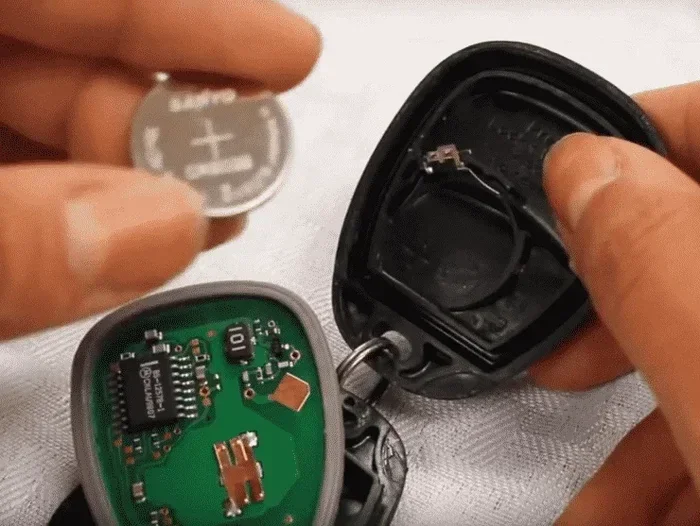
Before we dive into the reset question, let us talk about what is actually inside your car key. Most modern car keys contain a small coin-sized battery, usually a CR2025 or CR2032 model. This tiny power source sends a signal to your car when you press the unlock or start button. Without it, your key fob becomes nothing more than a small plastic remote.
The battery inside your car key typically lasts between two and four years. However, cold weather, frequent use, and low-quality batteries can shorten that lifespan significantly. When the battery starts to die, you may notice your key fob not working from a distance, or the signal becoming weak and intermittent.
Types of Car Keys That Use Batteries
Not all car keys look the same, and not all of them use batteries. Here is a quick breakdown of the common types:
- Key Fob Remotes: These are the most common. They have buttons for lock, unlock, and trunk release. They always contain a small battery.
- Smart Keys or Proximity Keys: These let you start the car with the push of a button, as long as the key is inside the vehicle. They always use a battery.
- Traditional Metal Keys: Some older cars use a plain metal key with no electronic components. These do not have a battery and never need a reset.
- Flip-Out Key Fobs: These combine a metal key with a remote. They have a battery and may require a reset after replacement.
If your car uses a smart key or key fob, there is a good chance you will need to deal with a reset at some point. Knowing your key type helps you prepare for what comes next.
Signs Your Car Key Battery Needs Replacement
How do you know the battery is dying before it dies completely? Look out for these telltale signs. Catching them early gives you time to prepare for the replacement and any potential reset you may need.
- Reduced range: You have to stand right next to the car for the key to work. This is the earliest and most common warning sign.
- Intermittent signal: The key works sometimes but not others. This often points to a low battery, not a broken key.
- Warning light on the dashboard: Many cars display a key fob icon when the battery is low. Check your instrument cluster for this symbol.
- Delayed response: There is a noticeable lag between pressing the button and the car responding.
- Key not recognized at all: In some cases, the car simply does not detect the key anymore. This can also happen after a battery change if the key needs reprogramming.
If you experience any of these symptoms, replacing the battery is your first move. But the real question remains: what happens after you pop that old battery out and slide the new one in?
Do You Have to Reset the Car Key After a Battery Change?
This is the million-dollar question, and the answer is: it depends. Let us look at when a reset is necessary and when it is not.
When Reset IS Necessary
Some car brands and models require a manual reset after every battery replacement. This is especially true for vehicles with advanced security systems. The car’s immobilizer system ties the key to the vehicle electronically. When you remove the battery, that connection breaks. The car no longer recognizes the key as a valid one.
Brands like BMW, Audi, and Mercedes-Benz often fall into this category. For these vehicles, you typically need to follow a specific sequence of button presses or use a diagnostic tool to re-sync the key with the car.
For example, on certain BMW models, you need to insert the key into the ignition, cycle the power, and hold specific buttons to re-establish the connection. If you do not complete this step, your car simply will not start. You may also find that your car won’t start right after turning off, which can be a related symptom of key sync issues.
When Reset Is NOT Necessary
On the other hand, many modern cars sync automatically. The moment you insert the new battery and press a button on the key fob, the car relearns the signal. No extra steps required. This is common in many Toyota, Honda, Ford, and Chevrolet models.
Some vehicles also feature a passive re-sync system. This means the car and key communicate continuously, and the system refreshes itself whenever the battery is replaced. You simply replace the battery, and everything works as before.
If you are unsure whether your car needs a reset, check your owner’s manual first. It is the most reliable source for your specific make and model. You can also search online for your car year, make, and model plus the phrase “key fob reset after battery change.”
How to Reset Your Car Key After Battery Replacement
If your car does require a reset, do not worry. The process is usually simple and takes only a few minutes. Below, we walk you through the general steps and brand-specific tips.
General Reset Steps for Most Car Keys
- Replace the battery: Use the correct battery type for your key fob. A CR2025 or CR2032 works for most models. Make sure the positive side faces the right direction when you insert it.
- Sit inside the car: Close all doors and sit in the driver’s seat.
- Turn the ignition on and off: Without starting the engine, cycle the key or push the ignition button to the “on” position, then back to “off.”
- Press the key fob buttons: Press the lock and unlock buttons on the key fob in quick succession.
- Wait for the signal: Listen for the car to beep or see the lights flash. This confirms the car has recognized the key.
- Start the engine: Try starting the car. If it starts, the reset was successful.
Brand-Specific Reset Tips
Different car brands have slightly different procedures. Here are a few examples to help you navigate the process.
For Hyundai owners, the process involves placing the key near the start button and following a specific button sequence. You can find detailed guidance in our article on how to start your Hyundai with a key, which covers the ignition process in detail.
For Ford vehicles, you typically need to cycle the ignition from off to on eight times within ten seconds, then press a button on the key fob. The doors lock and unlock to confirm the re-sync.
For Toyota and Honda models, many newer versions re-sync automatically. Simply replacing the battery and pressing any button on the fob while near the car does the trick.
If your key fob still does not work after following these steps, do not panic. There could be other factors at play. A weak signal after a battery change could also relate to broader car ignition issues that go beyond the key itself.
Tips to Extend Your Car Key Battery Life
Replacing a car key battery is easy enough, but who wants to do it more often than necessary? Here are some practical tips to help your key battery last longer.
- Avoid extreme temperatures: Heat and cold both drain batteries faster. Do not leave your key fob on the dashboard in direct sunlight or in a freezing car overnight.
- Use quality batteries: Cheap batteries die quickly. Invest in a reputable brand like Energizer or Duracell for consistent performance.
- Remove the battery when not in use: If you have a spare key that you rarely use, take the battery out to preserve its charge.
- Keep the key away from other electronics: Other electronic devices can interfere with the key fob signal and cause unnecessary battery drain.
- Replace both keys at the same time: If one key battery is dying, the other is probably close behind. Replace them together to avoid being stranded with a dead key.
These small habits add up over time and keep your key fob signal strong and reliable for years.
Common Mistakes to Avoid After Changing Your Key Battery
Even with the best intentions, people make mistakes during the key battery replacement process. Here are the most common ones and how to avoid them.
Forcing the Key Open
The key fob casing is thin and snaps together with gentle pressure. Forcing it open with a screwdriver or sharp object can crack the plastic, damage the circuit board, or scratch the key buttons. Use a small flathead screwdriver or a coin to gently pry the seam open.
Installing the Battery Backwards
This is a simple but costly mistake. The battery has a positive and negative side, and inserting it the wrong way will not power the key. Always check the orientation markings inside the battery compartment before closing it up.
Using the Wrong Battery Type
Not all key fobs use the same battery. Some use CR2025, others use CR2032, and a few use even smaller sizes. Check your owner’s manual or the old battery before purchasing a replacement. Using the wrong size means the battery may not fit or may not last long.
Skipping the Reset When Needed
Some people replace the battery and assume everything will work automatically. For certain car brands, skipping the reset means the car will not recognize the key at all. Always check whether your vehicle requires a post-battery-change reset.
Ignoring the Dashboard Warning Light
If your dashboard shows a key fob warning light after replacing the battery, do not ignore it. This light means the car still does not recognize the key, and a reset or further troubleshooting is needed.
When to Seek Professional Help
Most key battery replacements and resets are DIY-friendly tasks. But there are situations where professional help makes sense. If your key fob still does not work after replacing the battery and completing the reset procedure, there may be a deeper issue.
A damaged circuit board, a broken antenna inside the key, or a problem with the car’s security system could all be the culprit. In these cases, visiting a dealership or a qualified locksmith is the best move. They have the diagnostic tools and expertise to pinpoint the problem quickly.
Also, if you lost your only working key and need a replacement, a professional can program a new key to your vehicle. This is a more complex process that typically requires specialized equipment. Do not attempt this yourself unless you have experience with key fob programming.
Keep in mind that some car key not working issues after a battery change are simply caused by a defective new battery. Try a different battery from a fresh pack before assuming the worst.
Frequently Asked Questions
Can I still start my car if the key fob battery is completely dead?
In many modern cars, you can still start the vehicle even with a dead key fob battery. Most vehicles have a backup system that detects the key through the ignition or start button. You may need to hold the key fob directly against the start button or place it in a specific location near the steering column. Check your owner’s manual for the exact backup procedure.
How long does it take to reset a car key after a battery change?
The reset process usually takes between one and five minutes for most car brands. Some vehicles re-sync automatically the moment you insert the new battery, which takes only seconds. More complex systems, especially in luxury brands, may require a longer sequence of steps but still complete in under ten minutes.
What battery should I use to replace my car key battery?
The most common battery types for car key fobs are CR2025 and CR2032. Check your owner’s manual or look at the old battery inside the key fob to confirm the correct type. Using the wrong battery can prevent the key from working or damage the internal components.
Will my car key work immediately after replacing the battery?
For many car models, yes. The key works right away after a battery swap because the system re-syncs automatically. However, for certain brands like BMW or Audi, you may need to complete a manual reset first. If the key does not work immediately, do not panic. Follow the reset steps specific to your car model.
Can a dead car key battery drain the car battery?
No, a dead key fob battery cannot drain your car battery. The key fob operates on its own small battery and communicates with the car via a low-power radio signal. Even when the key fob battery is completely dead, it draws no power from the car’s electrical system.
How often should I replace my car key battery?
Most car key batteries last between two and four years, depending on usage and quality. If you notice the signal weakening or the range decreasing, it is time to replace the battery. Proactive replacement every two to three years helps you avoid being caught off guard with a dead key.
Final Thoughts
So, do you have to reset the car key after changing the battery? The answer is: sometimes yes, sometimes no. It all comes down to your car’s make, model, and key type. Many vehicles handle the transition seamlessly with no extra steps, while others require a quick reprogramming session to re-establish the connection between the key and the car.
The good news is that replacing a car key battery is one of the easiest and most affordable maintenance tasks you can do yourself. A few dollars for a new battery, a couple of minutes of your time, and you are back in business. Just remember to follow the correct procedure for your specific vehicle, avoid the common mistakes we covered, and consult your owner’s manual whenever you are unsure.
Taking care of your car key properly ensures it stays reliable for years to come. A little attention to detail now saves you from bigger headaches later. So the next time your key starts acting up, do not stress. Grab a new battery, follow the steps in this guide, and get back on the road with confidence.