Do Cars Still Come With Built In Navigation Systems
Do Cars Still Come With Built In Navigation Systems – the answer is more nuanced than you might think. Many new vehicles still offer factory-installed GPS, but the landscape has shifted dramatically with smartphone apps and wireless connectivity changing how drivers navigate. This guide breaks down everything you need to know about built-in car navigation, including pros, cons, and alternatives, so you can make the best decision for your next vehicle.
When you walk onto a car lot or browse online listings, one question often comes up: do cars still come with navigation systems? The short answer is yes, but the landscape has changed a lot over the past few years. Do Cars Still Come With Built In Navigation Systems is a question many buyers ask, and the answer depends on the brand, model, and trim level you choose.
Not too long ago, a factory-installed GPS was considered a must-have feature. Today, many drivers rely on their smartphones for turn-by-turn directions. Still, millions of people prefer the built-in approach. A car navigation system offers a larger screen, hands-free operation, and no dependence on cell signal or data plans. These vehicle features can make a real difference on long road trips and daily commutes alike.
This article dives deep into the world of built-in navigation systems. We will explore how they work, which brands still offer them, and whether they are worth the extra cost. You will also learn about alternatives like smartphone mapping and aftermarket navigation units. By the end, you will have a clear picture of your options and feel confident making the right choice for your next car.
Key Takeaways
- Factory navigation is still available: Many new cars from brands like Toyota, BMW, and Ford still offer built-in GPS as a standard or optional feature.
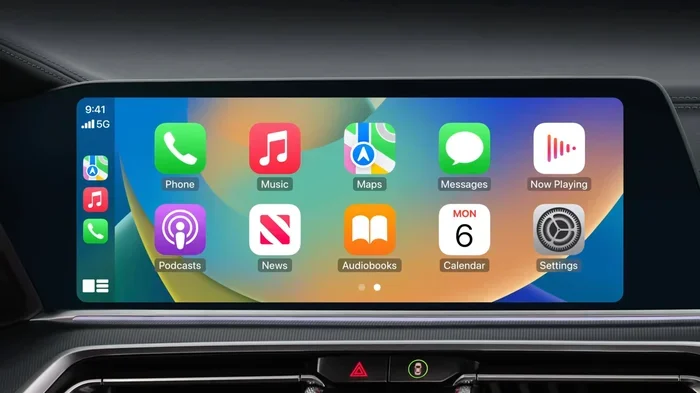
- Smartphone apps are the top alternative: Apple CarPlay and Android Auto have become the go-to navigation solution for millions of drivers.
- Built-in systems offer reliability: Factory GPS systems work without cell service and are integrated into the vehicle’s dashboard display for hands-free operation.
- Map updates matter: Factory navigation maps can become outdated, and updating them sometimes costs extra money or requires a dealer visit.
- Aftermarket options exist: You can add navigation to any car using portable GPS devices or dedicated aftermarket head units.
- Your driving habits matter: Frequent travelers may benefit more from built-in systems, while casual drivers might prefer phone-based navigation.
- Vehicle features vary widely: Not all trim levels include the same navigation capabilities, so always check the specifics before purchasing.
📑 Table of Contents
- Why Built-In Navigation Systems Are Still Relevant
- How Modern Car Navigation Systems Actually Work
- Built-In Navigation vs Smartphone Apps: The Big Comparison
- Which Car Brands Still Offer Built-In GPS
- Common Problems With Factory Car Navigation
- Should You Choose Built-In Navigation or Go Without?
- Conclusion
Why Built-In Navigation Systems Are Still Relevant
You might think that everyone has switched to phone-based navigation by now. And it is true that apps like Google Maps and Waze have become incredibly popular. But factory GPS still holds its ground for good reasons. Many drivers simply feel more comfortable with a dedicated system built right into their vehicle. The car entertainment system and navigation work together to create a seamless experience that a phone alone cannot match.
One of the biggest advantages of a built-in GPS is reliability. When you are driving through a remote area with poor cell coverage, your phone map might freeze or lose signal entirely. A factory navigation system uses its own GPS receiver and preloaded map data. This means it works even in areas with no internet connection. For drivers who frequently travel through rural areas, mountains, or deserts, this independence from cell towers is a huge advantage.
The Reliability Factor
Think about road trips through rural areas or mountain passes. Cell towers can be few and far between in these locations. A car navigation system with offline maps ensures you never lose your driving directions. You can trust the system to guide you even in the most remote locations where your phone would be useless.
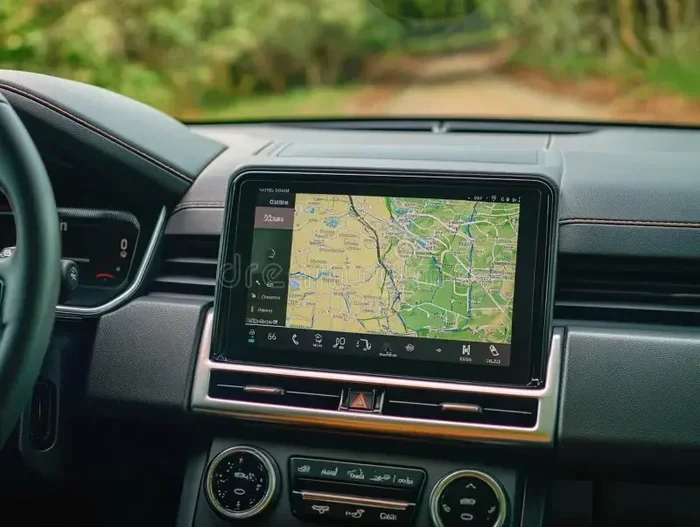
Also, built-in systems are designed to work seamlessly with the vehicle. The dashboard display is often larger and brighter than a phone screen. This makes it easier to read directions while keeping your eyes on the road. Many systems also integrate with the car’s audio system, so voice prompts come through the speakers clearly without needing to hold your phone. This level of integration is part of what makes car technology in modern vehicles so impressive.
Quick Tip: If you frequently drive in areas with weak cell coverage, a factory integrated navigation system can be a lifesaver. Look for vehicles that offer preloaded maps with offline capabilities. Always test the offline function during your test drive to confirm it works as expected.
Safety and Distraction Benefits
Using a phone while driving is a major distraction. Even with a mount, you still need to interact with a small screen. A factory navigation system is built into the dashboard, which means you can keep your eyes on the road. Many systems offer voice commands that let you set destinations without taking your hands off the wheel.
The car infotainment system also displays navigation on a large, high-resolution screen. This is much easier to read than a phone mounted on the dash. Some advanced systems even use the dashboard display to show augmented reality overlays, highlighting the correct lane for upcoming turns. These vehicle features represent a significant safety advantage over fumbling with a phone while driving.
How Modern Car Navigation Systems Actually Work
Understanding how a car navigation system works can help you appreciate the technology. Modern factory systems are quite sophisticated. They use a combination of GPS satellites, onboard processors, and stored map data to provide accurate turn-by-turn directions without needing an internet connection.
The Technology Behind Factory GPS
At its core, every GPS navigation system relies on signals from a network of satellites orbiting the Earth. The car’s receiver picks up these signals and calculates its exact position. This process happens in real time and works in almost any weather condition, rain or shine. The system then compares your position against detailed map data stored locally on the unit.
This map data includes roads, highways, points of interest, speed limits, and more. When you enter a destination, the system calculates the best route and provides driving directions through voice prompts and visual cues on the touch screen display. The entire process happens quickly and reliably, giving you confidence whether you are navigating a busy city or a quiet countryside road.
What Is Inside the System
A typical factory navigation system includes several key components that work together to deliver a smooth experience:
- GPS receiver: This picks up signals from satellites to determine your exact location in real time.
- Processor: This handles route calculations and map rendering quickly and efficiently.
- Storage: Map data is stored locally on the unit, often on a hard drive or flash memory chip.
- Display screen: A touch screen display shows the map, route, and directions in vivid detail.
- Connectivity module: Many modern systems include wireless connectivity for live traffic updates and map downloads.
- Audio system integration: Voice prompts are played through the car’s speakers for clear, hands-free guidance.
Some premium systems also include features like real-time traffic updates, gas station locators, and weather alerts. These extras make the navigation experience much more comprehensive and useful for daily driving. The car entertainment system often doubles as the navigation platform, combining music, radio, and directions into one unified interface.
Expert Insight: Modern OEM navigation systems have come a long way from the bulky units of the past. Today’s systems are essentially powerful computers mounted in your dashboard, running specialized software designed for automotive use. The processing power and map accuracy are genuinely impressive, and they continue to improve with each new model year.
Built-In Navigation vs Smartphone Apps: The Big Comparison
This is where things get interesting. Many drivers today use their phones for navigation instead of relying on factory systems. Both approaches have strengths and weaknesses. Let us break down the comparison to help you decide which option works best for your situation.
| Feature | Built-In Navigation | Smartphone Apps |
|---|---|---|
| Screen Size | Larger, integrated into dashboard | Smaller, depends on phone model |
| Offline Maps | Preloaded, always available | Limited offline support |
| Live Traffic Updates | Available with wireless connectivity | Excellent, real-time data |
| Map Accuracy | Good, but can be outdated | Excellent, frequently updated |
| Integration with Vehicle | Seamless, controls on steering wheel | Requires phone mount or CarPlay/Android Auto |
| Cost | Often included or expensive add-on | Free or low-cost subscriptions |
| Cell Dependency | Minimal for basic navigation | High for real-time features |
| Ease of Use | Familiar with vehicle controls | Intuitive, but smaller screen |
As you can see from the table, both options have clear advantages. The best choice depends on your driving habits, budget, and how much you value integration with your vehicle. Some drivers even use both, relying on the factory system for long trips and their phone for quick local errands.
Pros and Cons of Each Approach
Built-in navigation pros: Large screen, hands-free operation, no cell dependency for basic directions, integrated with vehicle controls, and a polished user experience that comes with the car. Built-in navigation cons: Maps can become outdated, updates may cost money, the system can be slow on older models, and it adds to the vehicle’s upfront price.
Smartphone app pros: Always up-to-date maps, free to use, real-time traffic data, frequent updates, and a familiar interface you already know. Smartphone app cons: Smaller screen, drains phone battery, requires cell data, can be distracting if not set up properly, and may not integrate well with the car’s audio system without Apple CarPlay or Android Auto.
Which Car Brands Still Offer Built-In GPS
If you are in the market for a new car and want factory navigation systems, you have more options than you might think. Several brands still offer built-in GPS across their lineup, from budget-friendly models to luxury vehicles. The availability of integrated navigation has expanded well beyond premium brands in recent years.
Luxury Brands Leading the Way
Premium brands have long been at the forefront of car technology. Brands like BMW, Mercedes-Benz, Audi, and Lexus continue to offer advanced infotainment systems with high-quality navigation as a standard or available feature. These systems often include stunning displays, voice recognition, and premium features like augmented reality navigation that overlays directions on the live camera feed.
BMW’s iDrive system, for example, is widely regarded as one of the best car infotainment platforms on the market. Mercedes-Benz offers its MBUX system with a powerful navigation system that learns your favorite destinations and suggests them proactively. These luxury systems set the standard for what factory navigation can do, and they make the driving experience more convenient and enjoyable.
Affordable Options with Factory Navigation
You do not need to buy a luxury car to get a good built-in GPS. Several mainstream brands offer navigation as either standard equipment or an affordable option on many models:
- Toyota: Many Toyota models come with their Entune or Infotainment system, which includes a navigation system with a touch screen display and wireless connectivity.
- Ford: Ford’s SYNC system offers integrated navigation on many models, including the F-150, Escape, and Explorer, making it easy to find your way on any trip.
- Honda: Honda’s Display Audio system provides car navigation system capabilities on higher trims of the Civic, Accord, and CR-V.
- Chevrolet: Chevrolet’s Infotainment 3 system includes a GPS navigation option on models like the Silverado and Equinox.
- Subaru: Subaru’s Starlink system offers navigation on models like the Outback and Forester, making it a great choice for outdoor enthusiasts who venture off the beaten path.
These brands prove that factory navigation is not just for luxury buyers anymore. Even mid-range and budget vehicles can come with a capable navigation system that gets you where you need to go reliably. The vehicle features available in these systems continue to improve, making them a solid choice for everyday drivers.
Common Mistake: Do not assume that a higher trim level always means better navigation. Sometimes the base navigation package is the same across trims, with the difference being in screen size or additional features like wireless charging and wireless connectivity. Always check the specifics before you buy to make sure you are getting what you need.
Common Problems With Factory Car Navigation
Factory navigation systems are not perfect. They come with their own set of frustrations that every driver should know about before choosing a vehicle based on its navigation features. Understanding these issues helps you set realistic expectations and plan accordingly.
Outdated Maps and Software
This is probably the biggest complaint about OEM navigation systems. Maps can become outdated within a year or two of purchase. New roads, changed speed limits, and removed businesses may not appear in the system. Some manufacturers charge for map updates, while others offer them for free for a limited time before requiring a subscription.
The problem is especially noticeable in fast-growing cities where new developments appear constantly. If you rely heavily on your car navigation system for daily commuting, outdated maps can lead to frustrating detours and missed turns. Always ask the dealer about the map update policy before you commit to a vehicle with factory navigation.
Slow Performance Issues
Older factory systems can be surprisingly slow. The processor may struggle to calculate routes quickly, and the dashboard display might lag when zooming in or out of the map. This can be dangerous if you need to change directions unexpectedly while driving in heavy traffic.
Some manufacturers have addressed this by updating their systems with faster hardware in newer models. But many older vehicles still suffer from sluggish performance. If you are considering a used car with factory navigation, test the system thoroughly during your test drive. Pay attention to how quickly it responds and how smoothly the touch screen display operates.
Quick Tips for Dealing with Factory Navigation Issues:
- Always check for available map updates when you first buy the car and set a reminder to check again every six months.
- Restart the system periodically to clear temporary glitches and keep it running smoothly.
- Keep your phone as a backup for real-time traffic and updated maps when you are in unfamiliar areas.
- Consider a factory reset if the system becomes unresponsive, but back up any saved destinations first.
Limited Search and POI Databases
Factory navigation systems often have smaller databases of points of interest compared to phone apps. Finding a specific restaurant or shop might be difficult if it is not in the system’s preloaded data. Smartphone mapping apps like Google Maps and Yelp have much more comprehensive databases of local businesses, reviews, and hours of operation. This is one area where phone-based navigation clearly has the edge.
Should You Choose Built-In Navigation or Go Without?
Deciding whether to get a car with factory navigation depends on several factors. Let us walk through some key considerations to help you make the right choice for your situation and budget.
Quick Tips for Making Your Decision
Here are some practical tips to guide your decision-making process:
- Assess your driving habits: If you drive long distances frequently or travel through unfamiliar areas, built-in navigation adds real value. If you mostly drive in your local area, you might not need it.
- Consider your budget: Factory navigation can add $500 to $2,000 or more to the price of a vehicle. Weigh this cost against the convenience and safety benefits it provides over the life of the car.
- Think about alternatives: If you already use a smartphone for navigation, you might save money by skipping factory GPS and using Apple CarPlay or Android Auto instead for a similar experience at no extra cost.
- Check the update policy: Find out how much map updates cost and how often they are available. Some brands offer free updates for the first few years, while others require a paid subscription.
- Test drive the system: Always test the navigation system thoroughly during your test drive. Check how fast it responds, how clear the directions are, and how easy it is to input destinations while driving.
When Built-In Navigation Makes Sense
There are clear situations where a built-in GPS is the better choice. If you frequently travel to unfamiliar cities or rural areas, factory navigation gives you peace of mind. The larger screen and integrated controls make it safer and more convenient than using a phone. You do not have to worry about mounting your device or draining your battery while navigating.
Families who road trip often also benefit from built-in systems. Kids can easily see the route on the big dashboard display, and everyone can enjoy turn-by-turn directions without anyone needing to hold a phone. The system also works reliably in areas with poor cell coverage, which is common on many cross-country routes through less populated regions.
When You Can Skip It
On the other hand, there are times when you can comfortably skip factory navigation. If you live in a city where you know every street, you probably do not need a dedicated GPS navigation system. Younger drivers who are comfortable with their phones might find that smartphone mapping is all they need for daily commuting and errands.
If your budget is tight, skipping factory navigation can save you hundreds of dollars that you can put toward other vehicle features you value more. You can always use your phone with a mount and a navigation app for a fraction of the cost. Many modern car technology features like Apple CarPlay and Android Auto bring smartphone-quality navigation to any vehicle, making factory GPS less essential than it once was.
Expert Insight: The automotive industry is moving toward a model where the car itself becomes a platform for apps and services. Wireless connectivity and over-the-air updates are making it possible for factory systems to stay current without costly dealer visits. This trend suggests that built-in navigation will continue to evolve and improve in the coming years, closing the gap with smartphone-based solutions.
Conclusion
So, do cars still come with navigation systems? The answer is a clear yes. Many new vehicles from a wide range of brands still offer factory-installed built-in navigation systems as standard or optional equipment. However, the way drivers navigate has changed significantly. Smartphone mapping and infotainment systems like Apple CarPlay and Android Auto have given drivers more choices than ever before.
Whether you choose a factory GPS navigation system or rely on your phone depends on your needs, budget, and driving habits. Built-in systems offer reliability, larger screens, and seamless integration with your vehicle. Smartphone apps offer up-to-date maps, real-time traffic data, and zero extra cost. Both approaches have their place, and the best choice is the one that fits your lifestyle.
The key is to evaluate what matters most to you. If you value reliability and seamless integration, a car navigation system is still a great feature worth considering. If you prefer flexibility and always-current data, your phone might be the better tool. Either way, Do Cars Still Come With Built In Navigation Systems remains a resounding yes, and the options available today are better than ever. Take the time to test different systems during your next test drive, and you will drive away with confidence knowing you made the right choice.
Frequently Asked Questions
Are built-in navigation systems worth the extra cost?
It depends on how often you travel to unfamiliar areas and how much you value a large, integrated screen. If you road trip frequently or drive in areas with poor cell coverage, factory navigation is worth the investment. For city drivers who mostly know their local area, a free phone app may be sufficient.
Can I add navigation to a car that does not have it?
Yes, you can add navigation to almost any car. Options include portable GPS mounts, aftermarket head units that replace your factory stereo, or simply using your smartphone with a mount and a navigation app. Apple CarPlay and Android Auto also bring smartphone-quality navigation to any compatible vehicle.
How often do factory navigation maps need updating?
Most manufacturers recommend updating maps at least once a year. Some brands offer free updates for the first three to five years, while others charge a subscription fee. Check with the dealer or manufacturer for the specific update policy before purchasing a vehicle.
Is smartphone navigation better than built-in?
Neither is universally better. Smartphone apps have more up-to-date maps and real-time traffic data, but built-in systems offer larger screens, offline reliability, and seamless integration with the vehicle. The best choice depends on your driving habits and preferences.
Do all new cars have GPS navigation?
No, not all new cars include GPS navigation. Many base trim levels do not offer it as standard, and it is often an optional add-on. However, most mid-range and higher trims across major brands now include some form of factory navigation or integrated navigation capability.
What happens when the built-in navigation system gets outdated?
Outdated maps can lead to incorrect routes, missed turns, and frustration. Some systems allow you to update maps via USB or over-the-air with wireless connectivity. Others require a visit to the dealer. Always check the update process and cost before buying a car with factory navigation.