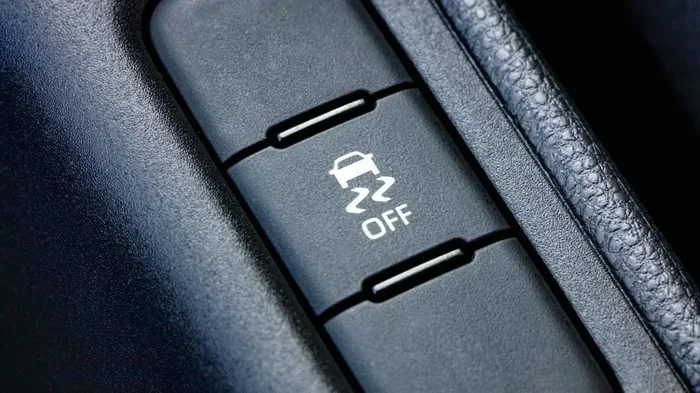
What Button Turns Off Traction Control on Your Car
Knowing what button turns off traction control can save you in tricky driving situations. The traction control button is usually found on the steering wheel or center console, and it lets you disable the system when you need more wheel spin. Understanding when and how to use this button helps you drive safer on ice, mud, and steep hills.
Have you ever been stuck in the snow or sliding on a wet road and thought, “I wish I could just turn off this traction control thing”? You are not alone. Many drivers wonder what button turns off traction control, especially when their car feels stuck or sluggish in certain conditions. The good news is that finding and using this button is usually pretty simple. Once you know where it is, you will feel more confident behind the wheel in all kinds of weather and terrain.
Traction control is a safety feature that helps your car keep grip when the road surface is slippery. It works by reducing engine power or applying the brakes to individual wheels when it detects wheel spin. This system is great for everyday driving. But sometimes, you actually need the wheels to spin. That is where the traction control button comes in. In this article, we will walk you through everything you need to know about this button. You will learn where it is, when to use it, and how to stay safe on the road.
Key Takeaways
- The traction control button is typically located on the steering wheel, dashboard, or center console depending on your car model.
- Turning off traction control allows wheels to spin freely, which helps when you are stuck in snow, mud, or sand.
- Most cars use a car icon with wavy lines as the traction control symbol on the dashboard.
- You should turn traction control back on after you are done driving in low-traction conditions.
- Some vehicles have a dedicated button, while others hide the traction control option inside a drive mode menu.
- Disabling traction control on wet roads can be dangerous and increase your risk of losing control.
📑 Table of Contents
Where Is the Traction Control Button Located?
The location of the traction control button varies from car to car. But do not worry. It is almost always easy to find once you know what to look for. Most car manufacturers place the button in one of three common spots. Let us go through each one so you can find yours quickly.
On the Steering Wheel
Many modern cars have the traction control button right on the steering wheel. It is usually located on the left side or the left spoke. You might need to look for a small button with a car icon and wavy lines underneath it. Some brands use a button labeled “TCS” or “TRAC.” If you have a steering wheel with lots of buttons, check the lower-left area first. This is the most common spot for the traction control switch.
On the Center Console
If it is not on the steering wheel, look at the center console. The center console is the area between the front seats, near the gear shifter. Some cars have the traction control button in this area, often near the climate controls or the infotainment system. It might be part of a cluster of buttons that control drive modes or hill descent control. Take a moment to look around this area. The button is usually clearly labeled.
Inside the Infotainment Screen
Newer vehicles, especially SUVs and luxury cars, may not have a physical traction control button at all. Instead, you might need to go into the infotainment screen to find it. Look for a menu called “Drive Settings,” “Vehicle Settings,” or “Drive Modes.” From there, you can toggle traction control on or off. Some cars also let you customize this setting through their mobile app. Check your owner’s manual if you cannot find the button physically.
What Does the Traction Control Button Do?
The traction control button is a simple switch that turns the traction control system on or off. When the system is on, your car monitors the speed of each wheel. If one wheel starts spinning faster than the others, the system steps in. It reduces engine power or applies the brakes to that specific wheel. This helps the car maintain grip and stay stable.
When you press the traction control button to turn it off, the system stops intervening. Your wheels can now spin freely if they lose grip. This might sound counterintuitive. After all, traction control is there to keep you safe. But there are real situations where you want the wheels to spin. Let us look at when that makes sense.
How Traction Control Works With ABS
Traction control works closely with your car’s ABS, or anti-lock braking system. Both systems use the same sensors to monitor wheel speed. ABS prevents your wheels from locking up when you brake hard. Traction control prevents your wheels from spinning when you accelerate. Together, they form a powerful safety net. When you turn off traction control, the ABS system usually stays active. This means you still have some braking protection even when traction control is off.
What Happens When You Press the Button?
When you press the traction control button, a light will appear on your dashboard. This is the traction control warning light. It usually looks like a car with wavy lines behind it. The light tells you that the system is no longer active. Some cars show a steady light. Others flash the light when the system has been deactivated. Either way, the message is clear. Your traction control is now off.
When Should You Turn Off Traction Control?
There are specific situations where turning off traction control makes sense. It is not something you want to do all the time. But knowing when to use it can make a big difference. Here are the most common scenarios.
Driving in Deep Snow
If your car is stuck in snow, traction control can actually work against you. The system sees the spinning wheels and reduces engine power. This cuts off the very spin you need to get moving. By turning off traction control, you let the wheels spin freely. This can help you rock the car forward and break free from the snow. It is a simple trick that many winter drivers rely on.
Getting Unstuck in Mud or Sand
Mud and sand are tricky surfaces. They do not provide enough grip for traction control to work effectively. The system keeps cutting power every time a wheel spins. This makes it very hard to move forward. Turning off traction control lets the wheels spin and dig into the surface. This creates a small channel that helps the car gain traction. It is a common technique used by off-road drivers and beach-goers alike.
Driving on Steep Hills
When climbing or descending a steep hill, you sometimes need more control over your wheels. Traction control can interfere with your ability to power through a steep incline. By turning it off, you can manage wheel spin manually. This gives you a more direct feel for how much power your wheels are getting.
Racing or Track Driving
On a racetrack or during spirited driving, experienced drivers often turn off traction control. They want full control over how much power goes to the wheels. Without traction control, the driver can manage wheel slip manually. This allows for faster acceleration out of corners. However, this should only be done by skilled drivers in safe environments.
Installing Snow Chains or Recovery Equipment
If you need to put snow chains on a stuck wheel or use a recovery strap, traction control can get in the way. The system might apply brakes or cut power at the wrong moment. Turning it off gives you full control during the setup process. Always remember to turn it back on when you are done.
How to Know If Traction Control Is On or Off
It is very important to know whether your traction control is active or not. Most cars make this easy with a dashboard indicator light. The traction control warning light is usually a small car icon with wavy lines behind it. When the system is on, the light stays off or glows briefly when you start the car. When you turn the system off, the light stays on. This tells you that traction control is disabled.
Some cars use different symbols. A few models show a triangle with an exclamation mark. Others display the letters “TC” or “TCS.” If you are unsure about your specific car, check the owner’s manual. It will show you the exact symbol for your vehicle. Getting familiar with this light can help you avoid confusion while driving.
What If the Light Stays On All the Time?
If the traction control warning light stays on even when you have not pressed the button, there might be an issue. A constantly lit light could mean the system has detected a fault. Common causes include a bad wheel speed sensor or a problem with the ABS module. In this case, it is a good idea to get the car checked by a mechanic. A diagnostic scan tool can read the error codes and point you in the right direction. Do not ignore a persistent traction control light. It could affect your safety on slippery roads.
Common Problems With the Traction Control Button
Like any part of your car, the traction control button can have issues over time. Most problems are minor and easy to fix. Here are some of the most common issues drivers face.
Button Sticking or Not Responding
Over time, the traction control button can get sticky or stop responding. This usually happens because of dirt, moisture, or general wear. If the button feels loose or does not click when you press it, try cleaning it with a small amount of electrical contact cleaner. If that does not work, the button itself may need to be replaced. This is a simple and inexpensive fix at most repair shops.
Traction Control Won’t Turn Off
Sometimes the traction control system will not turn off even when you press the button. This can happen if there is a fault in the system. It could also be caused by a software glitch. Try turning the car off and back on again. If the problem persists, check the fuse box. A blown fuse related to the traction control circuit can prevent the button from working. Refer to your owner’s manual for fuse box locations.
Warning Light Flashes Randomly
If the traction control light flashes randomly, it usually means the system is turning on and off by itself. This can be caused by a faulty wheel speed sensor. These sensors get dirty or damaged easily, especially in winter conditions. Cleaning the sensors or replacing them usually fixes the problem. A mechanic can diagnose this quickly with an OBD-II scanner.
Tips for Safe Driving With Traction Control
Traction control is one of the most important safety features in your car. It helps you maintain control in slippery conditions and during sudden stops. Here are some tips to get the most out of this system.
- Keep traction control on for everyday driving. It is designed to help you stay safe on wet, icy, and uneven roads. Turning it off should be a deliberate choice, not a default setting.
- Check your owner’s manual. Every car is different. The manual will tell you exactly where the traction control button is and how the system works in your specific model.
- Replace worn tires regularly. Even the best traction control system cannot work well with bald tires. Good tires give the system the grip it needs to function properly.
- Pay attention to dashboard lights. The traction control warning light tells you the status of the system. Learn what it looks like for your car and check it often.
- Do not rely solely on traction control. It is a safety aid, not a replacement for safe driving habits. Slow down on slippery roads and keep a safe following distance.
- Turn the system back on after off-road driving. If you disable traction control for snow, mud, or sand driving, make sure to reactivate it before hitting paved roads.
Quick Tips for Finding the Traction Control Button
Still cannot find your traction control button? Here are a few quick tips to help you locate it fast. First, check the owner’s manual. It has a diagram of the dashboard and console with all the buttons labeled. Second, search online for your car make and model plus “traction control button location.” Many car forums and YouTube videos show exactly where the button is. Third, look for the car icon with wavy lines on the dashboard. Press the button near that symbol. It is almost always the right one.
Key Takeaways
- The traction control button location is usually on the steering wheel, center console, or inside the infotainment screen.
- Turning off traction control allows wheels to spin freely, which helps in snow, mud, sand, and steep hills.
- The dashboard warning light shows whether traction control is on or off. A lit light means the system is off.
- Do not drive with traction control off on normal paved roads. It increases your risk of losing control.
- Common button problems include sticking, non-response, and random warning light flashes. Most are easy to fix.
- Always turn traction control back on after using it for off-road or low-traction driving.
Conclusion
So, what button turns off traction control? The answer is simpler than most people think. Whether it is on your steering wheel, center console, or hidden in the infotainment menu, the traction control button is easy to find once you know where to look. This feature gives you the flexibility to disable the system when you need extra wheel spin in snow, mud, or sand. But it also comes with responsibility. You should always turn it back on when you return to normal driving conditions.
Understanding your car’s traction control system makes you a safer and more confident driver. It helps you handle tricky road conditions with ease. Take a few minutes to locate the button in your car today. Read the owner’s manual if needed. The more you know about your vehicle, the better prepared you will be for whatever the road throws at you. Drive safe, stay aware, and enjoy the peace of mind that comes with knowing your car is working for you.
Frequently Asked Questions
Where is the traction control button in most cars?
The traction control button is most commonly found on the steering wheel, the center console, or inside the infotainment screen. Look for a small button with a car icon and wavy lines behind it. If you cannot find it, check your owner’s manual for the exact location in your specific car model.
What does the traction control warning light look like?
The traction control warning light usually looks like a small car with wavy lines underneath it. Some cars show “TCS,” “TC,” or a triangle with an exclamation mark. When the light is on, it means traction control is turned off or there is a system fault. If the light stays on constantly, it is a good idea to get your car checked by a mechanic.
Can you drive safely with traction control turned off?
You can drive with traction control off, but it is not recommended for normal road conditions. Without traction control, your wheels can spin more easily on wet or icy roads. This increases the risk of losing control. Only turn off traction control when you need extra wheel spin for specific situations like getting unstuck in snow or driving on sand.
Does turning off traction control affect ABS braking?
No, turning off traction control does not affect your ABS braking system. ABS and traction control are separate safety features that share some sensors. When you turn off traction control, your ABS system still works normally. This means you still have anti-lock braking protection even if traction control is disabled.
Why is my traction control button not working?
A traction control button that is not working could be caused by dirt, moisture, or a blown fuse. The button itself may also be worn out or stuck. Try cleaning it with electrical contact cleaner first. If that does not help, check the fuse box for a blown fuse related to the traction control circuit. If the problem continues, a mechanic can diagnose the issue with a diagnostic scanner.
Should I turn off traction control when driving in the snow?
Yes, turning off traction control can help when your car is stuck in deep snow. The system normally reduces engine power when it detects wheel spin. But when you are stuck, you need that spin to dig out. Once you are moving on cleared roads, turn traction control back on right away for safety.


