How Do I Reset My Volkswagen Computer Fast and Easy
Resetting your Volkswagen computer is simpler than you think and can solve many common dashboard warnings, performance issues, and error codes. Whether you use the battery disconnect method, an OBD-II scan tool, or an ignition cycle reset, this guide walks you through every step clearly. We also cover specific system resets, common mistakes to avoid, and when to visit a Volkswagen dealer for help.
So your Volkswagen is acting up. Maybe the check engine light is on, or the dashboard is flashing a warning you cannot figure out. Perhaps the car feels sluggish after a repair, or the infotainment system is frozen and unresponsive. Whatever the reason, you landed here because you want to know how to reset your Volkswagen computer and get things running smoothly again.
The good news is that resetting a VW computer is one of the most straightforward car maintenance tasks you can do. You do not need to be a mechanic. You do not need expensive tools (though some tools help). And you definitely do not need to spend hours at a dealership. This guide will walk you through every method, every tip, and every thing you need to know to reset your Volkswagen computer with confidence.
We will cover why you might need a reset, the different methods available, specific resets for different VW systems, common mistakes to avoid, and when it is smart to visit a professional. Whether you drive a Jetta, a Golf, a Tiguan, or any other model, this guide applies to you. Let us get started.
Key Takeaways
- Multiple reset methods exist: You can reset your VW computer using the battery disconnect, an OBD-II scan tool, or the ignition cycle method.
- Resetting solves common problems: Clearing warning lights, fixing error codes, and restoring factory settings are all achievable with the right approach.
- You do not need a dealer: Most VW computer resets can be done at home with basic tools and a little patience.
- Different systems need different resets: The infotainment system, dashboard lights, and oil service reminder each have their own reset process.
- Avoid common mistakes: Never reset without understanding what you are clearing, and always reconnect the battery correctly to avoid electrical damage.
- Visit a dealer when needed: Complex issues or persistent warning lights may require professional diagnostic equipment only a Volkswagen dealer can provide.
📑 Table of Contents
- What Does Resetting Your Volkswagen Computer Actually Do?
- When Should You Reset Your VW Computer?
- How To Reset Your Volkswagen Computer (Step-by-Step)
- Resetting Specific Volkswagen Systems
- Common Mistakes to Avoid When Resetting Your VW Computer
- Should You Visit a Volkswagen Dealer for a Computer Reset?
- Final Thoughts on Resetting Your Volkswagen Computer
What Does Resetting Your Volkswagen Computer Actually Do?
Before you dive into the how, it helps to understand the what. Your Volkswagen has an onboard computer, often called the ECU (Engine Control Unit), that monitors and manages nearly every system in the car. It tracks sensor data, controls fuel injection, manages emissions, and stores error codes when something goes wrong.
When you reset the Volkswagen computer, you are essentially clearing the stored data and error codes. Think of it like restarting your phone when it gets glitchy. Sometimes the computer holds onto old information that is no longer relevant, and clearing it gives the system a fresh start. The VW reset process does not erase your personal settings like radio presets or Bluetooth connections (more on that later).
It is also worth noting that Volkswagen is part of the Volkswagen Group, which owns brands like Porsche, Audi, and Bentley. So the computer systems in your VW share some similarities with those in other group vehicles. But for this guide, we are focused purely on your Volkswagen.
What Gets Cleared When You Reset?
Here is a quick list of what a Volkswagen computer reset typically clears:
- Diagnostic trouble codes (DTCs): These are the error codes stored when a sensor detects a problem.
- Warning lights: Dashboard lights like the check engine light, oil pressure light, or battery warning light.
- Adaptation values: The computer learns your driving habits over time. A reset clears these learned values temporarily.
- Service intervals: Oil change reminders and maintenance alerts can be cleared with a reset.
What does not get cleared? Your radio presets, Bluetooth pairings, window settings, and personal preferences usually stay intact. So you do not have to worry about losing all your customized settings.
When Should You Reset Your VW Computer?
Not every car problem requires a computer reset. Knowing when to reset saves you time and prevents unnecessary work. Here are the most common situations where a Volkswagen computer reset makes sense.
Dashboard Warning Lights That Won’t Go Away
We have all been there. You fix the problem, but the warning light stays on. This is incredibly common with Volkswagens. The ECU stores the error code even after the actual issue is resolved. A reset clears that stored code and turns off the stubborn light.
For example, if you had a loose gas cap that triggered the check engine light, tightening it might not immediately turn the light off. A reset tells the computer to stop displaying that warning. Just keep in mind that if the underlying problem is not truly fixed, the light will usually come back.
After Maintenance or Repairs
If you have recently had work done on your Volkswagen, resetting the computer helps the system recalibrate. This is especially true after oil changes, brake pad replacements, or sensor replacements. The VW maintenance reset clears the service reminder and lets the computer start tracking fresh intervals.
Some owners also reset after installing aftermarket parts like a new air filter, exhaust system, or performance chip. The computer needs to relearn how to work with the new components, and a reset helps kickstart that process.
Performance and Fuel Economy Issues
If your Volkswagen feels sluggish, has rough idling, or your fuel economy has dropped, a reset can sometimes help. The computer adapts to driving conditions over time, and sometimes those adaptations get stuck or corrupted. A reset gives the system a clean slate to relearn your driving patterns.
However, if you have serious performance problems, do not just reset and hope for the best. A persistent issue likely points to a real mechanical problem that needs proper diagnosis. In that case, it is worth visiting a trusted mechanic or a Volkswagen dealer for a professional diagnostic scan.
How To Reset Your Volkswagen Computer (Step-by-Step)
Now for the part you have been waiting for. Here are the three most effective methods to reset your Volkswagen computer. Each method works for different situations, so pick the one that fits your needs.
Method 1: The Battery Disconnect Method
This is the most popular and accessible method. It requires no special tools and works on virtually every Volkswagen model.
- Turn off the engine and remove the keys from the ignition.
- Open the hood and locate the car battery. In most Volkswagens, the battery is in the engine bay on the left side.
- Disconnect the negative (black) terminal first. Use a wrench to loosen the clamp and carefully remove the cable.
- Wait at least 15 to 30 minutes. This allows the capacitors in the computer to fully discharge and the stored memory to clear.
- Reconnect the negative terminal and tighten the clamp securely.
- Start the engine and let it idle for a few minutes. The computer will reboot and recalibrate.
Quick Tip: Some VW models may need a few drive cycles for the computer to fully relearn. Drive normally for 20 to 30 minutes after the reset to let the system recalibrate properly.
Important: If your Volkswagen has a radio security code, you may need to enter it after reconnecting the battery. Check your owner’s manual for the code if you are unsure.
Method 2: Using an OBD-II Scan Tool
An OBD-II scan tool is the most precise way to reset your Volkswagen computer. It connects directly to the diagnostic port and can clear specific codes without affecting other systems.
- Locate the OBD-II port in your Volkswagen. It is usually under the dashboard on the driver’s side, near the steering column.
- Plug in the scan tool and turn the ignition to the “on” position (do not start the engine).
- Follow the tool’s menu to read any stored diagnostic codes. Write them down for your records.
- Select the option to clear or erase the codes. The tool will communicate with the ECU and reset the stored data.
- Turn off the ignition, wait a minute, then restart the engine to confirm the reset worked.
OBD-II scan tools range from basic code readers (around $20) to professional-grade tools (several hundred dollars). For most VW owners, a basic reader is more than sufficient for a simple reset. If you want a reliable option, look for a scan tool that supports Volkswagen-specific protocols.
Method 3: The Ignition Cycle Reset
This method works for some Volkswagen models and is a gentler alternative to the battery disconnect. It does not fully drain the computer’s memory but can clear minor error codes and reset certain warnings.
- Turn the ignition key to the “on” position without starting the engine.
- Wait 10 seconds, then turn the key to the “off” position.
- Wait another 10 seconds.
- Repeat this cycle two more times (three total cycles).
- Start the engine and check if the warning light or error has cleared.
This method is not as powerful as the battery disconnect or scan tool, but it works well for minor glitches and occasional warning lights that do not indicate a serious problem.
Resetting Specific Volkswagen Systems
A full computer reset clears the ECU, but Volkswagen has several other onboard systems that sometimes need their own separate reset. Here is how to handle the most common ones.
VW Infotainment System Reset
If your touchscreen is frozen, slow, or glitchy, resetting the infotainment system is different from resetting the main computer. For most Volkswagens, you can do this by holding down the power button on the screen for 10 to 15 seconds until the system restarts. Some models also allow you to access a factory reset through the settings menu under “System” or “Factory Reset.”
Keep in mind that a factory reset on the infotainment system may restore the system to its original settings, which could mean losing paired phones and saved navigation favorites. Back up any important data before doing a full factory reset.
VW Dashboard and Warning Light Reset
Some Volkswagen warning lights can be reset individually without touching the main ECU. For example, the tire pressure monitoring system (TPMS) light often has its own reset procedure. Check your owner’s manual for the specific button combination or menu path for your model.
For general dashboard lights, the battery disconnect method usually handles them all at once. But if you only have one stubborn light, using an OBD-II scan tool to target that specific code is the cleanest approach.
VW Oil Service Reset
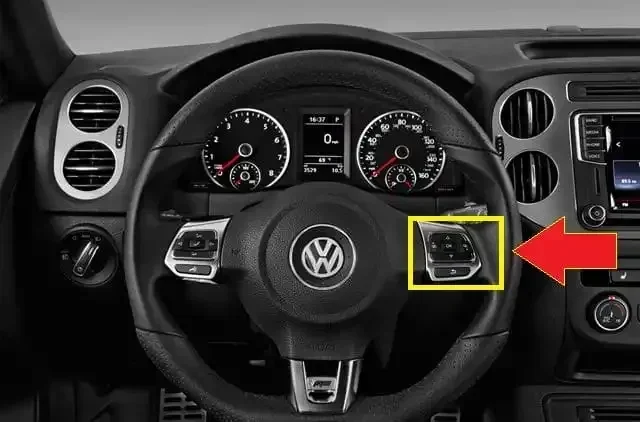
After an oil change, you will likely need to reset the oil service reminder. In most Volkswagens, you can do this through the instrument cluster. Turn the ignition to “on,” then use the steering wheel buttons to navigate to the service menu. Select “Oil Service Reset” and confirm. The reminder should disappear, and the new service interval will begin counting from zero.
Common Mistakes to Avoid When Resetting Your VW Computer
Resetting your Volkswagen computer is generally safe, but there are a few mistakes that can cause problems. Here is what to watch out for.
- Disconnecting the wrong battery terminal: Always disconnect the negative terminal first. Removing the positive terminal can cause short circuits and damage electrical components.
- Resetting without fixing the root cause: If your check engine light is on because of a real problem, resetting the computer will only hide the symptom temporarily. The light will come back, and the problem may get worse.
- Not waiting long enough: Rushing the battery disconnect method by reconnecting after only 5 minutes may not fully clear the computer’s memory. Give it at least 15 to 30 minutes.
- Forgetting the radio code: Some Volkswagens require a security code after a battery disconnect. If you do not have it, you may lose radio functionality until you retrieve it. You can often get the code from your VIN number through the dealer or online.
- Using a cheap scan tool that is incompatible: Not all OBD-II scanners work well with Volkswagen-specific systems. Invest in a tool that supports VW protocols for the best results.
Avoiding these mistakes will save you time, money, and frustration. A careful reset is a quick reset.
Should You Visit a Volkswagen Dealer for a Computer Reset?
For most resets, you can handle the job yourself at home. But there are situations where visiting a dealer makes sense. If you have tried all the methods above and warning lights persist, a deeper issue may be at play. A dealer has access to Volkswagen-specific diagnostic software like VCDS (VAG-COM) that can read and clear codes at a level that basic scan tools cannot reach.
Dealers can also perform a Volkswagen diagnostic reset that goes beyond what you can do with an aftermarket tool. This is especially useful if your car is still under warranty, as a dealer reset ensures the work is properly documented in your service history.
If you are near Lexington, Kentucky, and need professional help, the team at Don Jacobs Volkswagen is a well-known option for VW owners in the area. They can handle everything from simple resets to complex diagnostics.
That said, for most routine resets, you do not need to visit a dealer. The methods in this guide will handle the vast majority of situations. Save the dealer visit for when you have a problem that just will not go away.
Final Thoughts on Resetting Your Volkswagen Computer
Resetting your Volkswagen computer is one of the most useful skills any VW owner can have. It is fast, it is usually free, and it solves a surprising number of common car problems. Whether you use the battery disconnect method, an OBD-II scan tool, or the ignition cycle reset, the key is to understand what you are doing and why.
Always start by identifying the real problem. A reset is a tool, not a cure. If your car has a genuine mechanical issue, no amount of resetting will fix it permanently. But for cleared codes, stubborn warning lights, and sluggish performance after maintenance, a reset can work wonders.
Remember to follow the safety tips, avoid the common mistakes, and do not hesitate to visit a professional when the situation calls for it. With the knowledge in this guide, you are well equipped to handle your Volkswagen computer reset with confidence. Drive safe, and enjoy the fresh start for your VW system.
Frequently Asked Questions
Will resetting my VW computer erase my radio presets and Bluetooth connections?
In most Volkswagen models, a standard ECU reset does not erase radio presets or Bluetooth pairings. However, if you disconnect the battery and your radio has a security code, you may need to enter the code to restore functionality. A full factory reset of the infotainment system is different and may clear paired devices, so always check before doing a full system reset.
How much does it cost to reset a Volkswagen computer?
If you do it yourself using the battery disconnect method or a basic OBD-II scan tool, the cost is essentially zero. If you visit a dealership or mechanic, expect to pay between $50 and $150 for a professional diagnostic reset, depending on your location and the complexity of the reset needed.
Can I reset my VW computer myself without any special tools?
Yes, the battery disconnect method requires no special tools at all. You just need a wrench to loosen the battery terminal clamp and about 30 minutes of waiting time. The ignition cycle method also requires no tools. However, an OBD-II scan tool makes the process faster and more precise if you plan to do resets regularly.
How often should I reset my Volkswagen computer?
You should not reset your VW computer regularly as a maintenance routine. A reset is only needed when you have a specific issue like a persistent warning light, after completing a repair, or when clearing error codes after maintenance. Frequent unnecessary resets can actually disrupt the computer’s learned adaptations and cause more problems than they solve.
What happens if I don’t reset my VW computer after a repair?
If you do not reset the computer after a repair, the ECU may continue to display old error codes or warning lights even though the problem is fixed. The system will not relearn new adaptation values for the repaired component, which can sometimes lead to suboptimal performance until the computer recalibrates on its own through normal driving.
Is it safe to disconnect the battery to reset the Volkswagen computer?
Yes, disconnecting the battery is safe when done correctly. Always disconnect the negative terminal first, wait at least 15 minutes, and reconnect it securely. Make sure your ignition is off and keys are removed before working on the battery. If your car has a radio security code, have it ready before disconnecting the battery.



3 Comments