Can Navigation Be Added to a Toyota Here Are the Facts
Can navigation be added to a Toyota? Yes, you absolutely can. Whether you own a older model or a brand-new SUV, there are several ways to get GPS navigation working in your vehicle. You can choose a factory upgrade from your Toyota dealer, install an aftermarket head unit, or even use your smartphone as a temporary solution. This guide walks you through every option so you can pick the best one for your budget and your car.
Toyota has been one of the most popular car brands in the world for decades. Millions of drivers trust their Toyotas for daily commutes, road trips, and everything in between. But here is a question that comes up more often than you might think: can navigation be added to a Toyota?
The short answer is yes. The longer answer depends on your specific model, year, and budget. Some Toyotas come with navigation already built in, while others need a little extra work. In this article, we will walk you through every option available. Whether you drive a compact Corolla or a rugged 4Runner, there is a solution for you.
We will cover factory-installed systems, aftermarket head units, smartphone-based options, and everything in between. By the end of this guide, you will know exactly what is possible and what makes the most sense for your situation. Let us dive right in.
Key Takeaways
- Factory Navigation: Toyota offers built-in navigation in many newer models, and you can often add it to older cars through a dealer upgrade.
- Aftermarket Systems: Third-party head units from brands like Garmin and Pioneer offer affordable and feature-rich alternatives.
- Smartphone Apps: Apps like Google Maps and Apple CarPlay can serve as a quick and free navigation solution.
- Cost Range: Adding navigation can cost anywhere from $50 for a phone mount to $1,500+ for a full factory-style system.
- Compatibility Matters: Not every Toyota model accepts every navigation option, so always check compatibility first.
- DIY Is Possible: Many aftermarket installs are straightforward and can be done at home with basic tools.
📑 Table of Contents
- Understanding Toyota Navigation Systems
- Factory Navigation Upgrade Through a Toyota Dealer
- Aftermarket Navigation Options for Toyota
- Using Your Smartphone as a Toyota Navigation Solution
- Cost of Adding Navigation to a Toyota
- Common Mistakes to Avoid When Adding Navigation
- Benefits of Having Navigation in Your Toyota
- Final Thoughts
Understanding Toyota Navigation Systems
Before you decide how to add navigation, it helps to understand what Toyota already offers. Toyota has used different systems over the years, and knowing which one your car has makes a big difference.
Factory-Installed Toyota Navigation
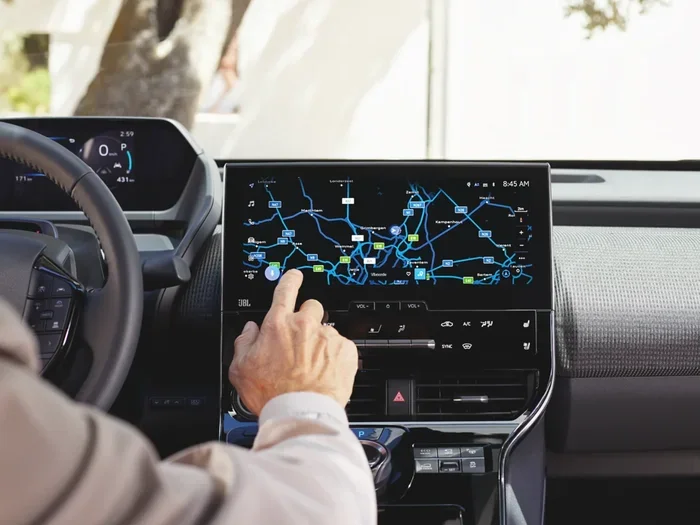
Newer Toyota models often come with a Toyota navigation system already built into the dashboard. These systems use a dedicated GPS module and a built-in map database. They typically include features like voice guidance, traffic updates, and points of interest search.
Toyota calls its infotainment platform by different names depending on the era. Older models used the Toyota Entune system. Newer vehicles use Toyota Multimedia or the more recent Toyota Audio platform. Each version has slightly different capabilities, but they all serve the same core purpose: helping you find your way.
If your Toyota already has a touchscreen display, there is a good chance it supports navigation. Models like the RAV4, Camry, Highlander, and Tacoma often include this feature as part of a technology package. You can check your owner’s manual or look at the infotainment home screen for a navigation icon.
Toyota Models That Support Navigation
Not every Toyota model comes with navigation from the factory. Here is a quick look at which models commonly support it:
- Toyota RAV4: Available on higher trims, especially the XLE and Limited editions.
- Toyota Camry: Standard on XSE and XLE trims in recent years.
- Toyota Highlander: Available on XLE and Limited trims.
- Toyota Tacoma: Offered on TRD Off-Road and higher trims.
- Toyota 4Runner: Often included on Limited and TRD Pro trims.
- Toyota Sienna: Available on higher trims with the multimedia system.
If your model does not list navigation as a standard feature, do not worry. There are still plenty of ways to get it added, which we will cover next.
Factory Navigation Upgrade Through a Toyota Dealer
If your Toyota does not have navigation but you want a seamless, integrated experience, a factory upgrade from your dealer is one of the best routes. This is especially true for Toyota navigation upgrade options that match your car’s original design and feel.
How a Dealer Navigation Installation Works
When you visit a Toyota dealer, they can check your vehicle’s compatibility with a navigation retrofit kit. This kit typically includes a new head unit, wiring harness, and antenna. The dealer installs everything and pairs it with your car’s existing system.
The process usually takes a few hours. You do not need to worry about cutting wires or removing panels yourself. The dealer handles everything professionally. Once installed, your new navigation system will look and feel like it came with the car from day one.
Pros and Cons of a Factory Upgrade
Let us look at the benefits and downsides of going the factory route:
- Pros:
- Seamless integration with your Toyota’s design
- Updates are handled through the dealer
- Preserves your factory warranty
- High-quality maps and voice guidance
- Cons:
- Can be expensive, often $500 to $1,500
- May not be available for older models
- Map updates can cost extra over time
One thing to keep in mind is that not every Toyota model can accept a factory navigation retrofit. Older cars from before 2010 may not have the wiring or display compatibility needed. Always call your local dealer first to confirm your car qualifies.
Aftermarket Navigation Options for Toyota
If the factory route does not fit your budget or your car is too old for a dealer retrofit, aftermarket options open up a world of possibilities. An aftermarket navigation Toyota setup can be just as good or even better than factory in many cases.
What Is an Aftermarket Head Unit?
An aftermarket head unit is a replacement for your car’s factory radio. It plugs into your existing dashboard and offers a brand-new touchscreen with built-in GPS navigation. Popular brands include Garmin, Pioneer, Kenwood, and Sony.
These units come with preloaded maps, traffic updates, and even Bluetooth connectivity. Many of them also support Toyota infotainment features like backup cameras and steering wheel controls. The best part is that you can often install them yourself if you are comfortable with basic car electronics.
Popular Aftermarket Navigation Units for Toyota
Here are some of the most popular options that work well with Toyota vehicles:
- Garmin DriveSmart Series: These are standalone units that mount on your dashboard. They do not replace your factory radio but add full navigation capability. They are easy to install and very reliable.
- Pioneer DMH Series: These are full replacement head units with built-in GPS. They offer large touchscreens, Apple CarPlay, and Android Auto compatibility.
- Kenwood Excelon Series: Known for clear audio and solid navigation features. These units are a great all-around choice.
- Sony XAV-AX Series: Sony units offer excellent display quality and smooth navigation performance.
When choosing an aftermarket unit, make sure it is compatible with your Toyota model. Some Toyotas use a specific dash kit or wiring harness adapter. You can find these adapters easily online, and they make the installation process much smoother.
Adding Car Tech Features Beyond Navigation
One great thing about aftermarket systems is that they often come with bonus features. For example, many modern head units let you connect iPhone to CarPlay wirelessly, giving you access to apps, music, and messaging right from your dashboard. You can also add features like blind spot monitoring to improve your safety on the road. These extras make an aftermarket upgrade even more worthwhile.
Using Your Smartphone as a Toyota Navigation Solution
Not everyone wants to spend hundreds of dollars on a navigation system. The good news is that your smartphone can do a lot of the heavy lifting. With a few simple accessories, you can turn your phone into a fully functional GPS navigator for your Toyota.
Smartphone Mounts and Chargers
The easiest and cheapest way to use your phone for navigation is to mount it on your dashboard or windshield. A good quality phone mount keeps your device secure while driving. Pair it with a car charger, and you have a reliable setup that costs under $50.
Apps like Google Maps, Waze, and Apple Maps all offer turn-by-turn navigation for free. They use your phone’s GPS to track your location and provide real-time traffic updates. This means you get the same core functionality as a built-in system without any installation hassle.
Wireless CarPlay and Android Auto
If your Toyota has a compatible infotainment screen, you can use wireless Apple CarPlay or Android Auto to mirror your phone’s navigation app directly onto the car’s display. This gives you a bigger screen and better visibility while keeping your phone safely in your pocket.
Some older Toyotas do not support wireless CarPlay, but a wired connection still works well. You just need a USB cable to connect your phone to the car’s audio system. From there, you can launch your preferred navigation app and get directions just like you would on your phone.
Cost of Adding Navigation to a Toyota
Cost is one of the biggest factors when deciding how to add navigation. The price varies a lot depending on the method you choose. Here is a breakdown of what you can expect.
Cost Comparison Table
Here is a simple comparison of the different navigation addition methods and their typical costs:
- Smartphone Mount and App: $20 to $50. This is the most affordable option and works with virtually any Toyota.
- Aftermarket Head Unit: $200 to $800. Prices vary based on brand, screen size, and features.
- Garmin Standalone GPS: $100 to $400. A good middle-ground option that does not require replacing your factory radio.
- Factory Dealer Retrofit: $500 to $1,500. The most expensive option but offers the most seamless integration.
If you are on a tight budget, the smartphone route is hard to beat. If you want a permanent, integrated solution, the factory dealer upgrade or an aftermarket head unit is the way to go. Think about how long you plan to keep the car and how often you use navigation when deciding.
Common Mistakes to Avoid When Adding Navigation
Adding navigation to your Toyota is a great project, but there are some mistakes you should watch out for. Avoiding these pitfalls will save you time, money, and frustration.
Skipping Compatibility Checks
The most common mistake is buying a navigation unit without checking if it fits your Toyota model and year. Different Toyotas have different dashboard sizes, wiring configurations, and dash kit requirements. Always double-check compatibility before you buy anything.
Ignoring Wiring and Power Requirements
Some aftermarket head units require a constant power source and a switched ignition wire. If you do not wire these correctly, your unit may not turn on or off with your car. Take the time to follow the wiring diagram that comes with your unit, or ask a professional for help.
Forgetting About Map Updates
Navigation maps get outdated over time. Many people forget to budget for map updates, which can cost anywhere from $20 to $100 per year depending on the system. Before you buy, check whether the system offers free lifetime updates or if you will need to pay for them going forward.
Benefits of Having Navigation in Your Toyota
You might wonder whether adding navigation is really worth it. The answer is yes, and here is why.
First, navigation gives you confidence on unfamiliar roads. You do not have to worry about wrong turns or getting lost. The voice guidance tells you exactly when to turn, which exit to take, and where to go next.
Second, many modern navigation systems include real-time traffic data. This means the system can reroute you around congestion, accidents, and road closures. You can save significant time on your daily commute and on longer trips.
Third, having a dedicated navigation screen means your phone stays free for calls and music. You do not have to balance your phone on the passenger seat or mount it awkwardly on the dash.
Finally, a good navigation system can increase your car’s resale value. Buyers love having GPS already built in, and it makes your Toyota more appealing on the used market.
Final Thoughts
So, can navigation be added to a Toyota? Absolutely. You have more options today than ever before. Whether you choose a factory upgrade from your dealer, an aftermarket head unit, or simply use your smartphone with a mount, you can get reliable GPS navigation working in your Toyota.
The best choice depends on your budget, your car model, and how much installation work you are willing to do. If you want a seamless, integrated experience, go with the factory route. If you want flexibility and value, an aftermarket unit or a smartphone app is the way to go.
Take your time, do your research, and pick the option that fits your needs best. Once your new navigation system is up and running, you will wonder how you ever drove without it. Safe travels and happy navigating.
Frequently Asked Questions
Can I add navigation to an older Toyota model?
Yes, you can add navigation to older Toyota models using aftermarket head units or standalone GPS devices like Garmin. The key is to check compatibility with your specific model and year before purchasing any equipment.
How much does it cost to add navigation to a Toyota?
The cost ranges from about $20 for a simple phone mount to $1,500 for a full factory dealer retrofit. Most aftermarket head units fall in the $200 to $800 range, making them a popular middle-ground option.
Is it better to use a smartphone app or a built-in system?
Both have their strengths. Smartphone apps like Google Maps and Waze offer free, up-to-date maps and real-time traffic. Built-in systems provide a seamless dashboard experience and do not rely on your phone’s battery or data connection.
Can I install an aftermarket navigation unit myself?
Yes, many aftermarket head units are designed for DIY installation. You will need basic tools and a wiring harness adapter specific to your Toyota model. If you are not comfortable with car electronics, a professional installer can handle it for you.
Do Toyota navigation systems receive map updates?
Yes, most Toyota navigation systems receive map updates. Factory systems can be updated through your Toyota dealer, while aftermarket units often allow you to download updates directly from the manufacturer’s website.
Will adding navigation void my Toyota warranty?
Installing an aftermarket navigation unit should not void your warranty unless it causes damage to other components. To be safe, consider having the installation done by a professional or at a Toyota dealer to avoid any potential issues.
=== CONCLUSION ===
Adding navigation to your Toyota is easier and more affordable than most people think. From factory upgrades to smartphone apps, there is a solution for every budget and every model. The primary keyword we explored today shows that Toyota owners have plenty of options to choose from. Whether you go with a dealer-installed system or a DIY aftermarket unit, the result is the same: a smarter, more connected driving experience.
Take the time to evaluate your needs, compare costs, and pick the option that works best for you. Your next road trip will be smoother and stress-free with a reliable navigation system guiding the way.