Start Your Car With App Instead of a Traditional Key
Starting your car with an app instead of a traditional key is one of the biggest upgrades in modern automotive technology. You can warm up your vehicle, lock the doors, and even locate your car from your phone. This guide covers everything you need to know about keyless app-based car starting, how it works, which cars support it, and whether it is safe and worth the investment.
Imagine walking out of your house on a freezing winter morning. You grab your phone, tap an app, and your car starts warming up before you even step outside. No fumbling with keys. No standing in the cold. That is the reality of starting your car with an app instead of a traditional key. This technology has transformed how we interact with our vehicles. It is fast, convenient, and surprisingly easy to use.
If you have been curious about keyless car starting and how it works, you are in the right place. This article breaks down everything from the basic technology behind app-based ignition to the best systems on the market. Whether you own a new smart car or want to upgrade an older vehicle, there is something here for you.
Key Takeaways
- App-based car starting lets you ignite your engine remotely using your smartphone, replacing the need for a physical key or key fob.
- Keyless entry and remote start systems offer unmatched convenience, especially in extreme weather when you want to pre-condition your car.
- Most modern vehicles from brands like Tesla, BMW, Ford, and Hyundai support smartphone-based ignition through dedicated mobile apps.
- Aftermarket solutions are available for older cars, so you do not need to buy a new vehicle to enjoy app-based starting.
- Security features like encryption, multi-factor authentication, and GPS tracking protect your vehicle when using app-controlled systems.
- Setting up app-based car starting is simple, but you should always follow manufacturer guidelines for best results.
📑 Table of Contents
- What Is Keyless Car Starting?
- How Does App-Based Car Starting Work?
- Benefits of Starting Your Car With an App
- Popular Cars and Systems That Support App-Based Starting
- How to Set Up App-Based Car Starting
- Is App-Based Car Starting Safe and Secure?
- Future of Car Starting: Where Is This Technology Heading?
- Common Mistakes People Make With App-Based Car Starting
- How App-Based Starting Compares to Traditional Keys
What Is Keyless Car Starting?
Keyless car starting means you can turn on your engine without inserting a physical key. Instead, your smartphone acts as your digital key. You use a dedicated mobile app to communicate with your vehicle. The app sends a signal that triggers the ignition system remotely.
This technology is part of a bigger trend called connected car technology. Cars today are essentially computers on wheels. They have sensors, internet connections, and smart features that make driving easier and safer. App-based vehicle ignition is one of the most popular features among new car buyers.
How Is This Different From a Traditional Key?
A traditional key requires you to physically insert it into the ignition cylinder and turn it. With keyless entry and app-based starting, there is no physical interaction needed at all. Your phone does the work. You can start the engine from dozens of feet away, or even from another city if the system supports it.
Some people confuse remote start with app-based starting. While they are related, they are not the same. A traditional remote start uses a small handheld remote control. App-based starting uses your smartphone and an internet connection. The range is much greater, and you get more features.
How Does App-Based Car Starting Work?
The technology behind starting a car with an app is simpler than most people think. Here is a quick look at how it all comes together.
The Role of Your Smartphone
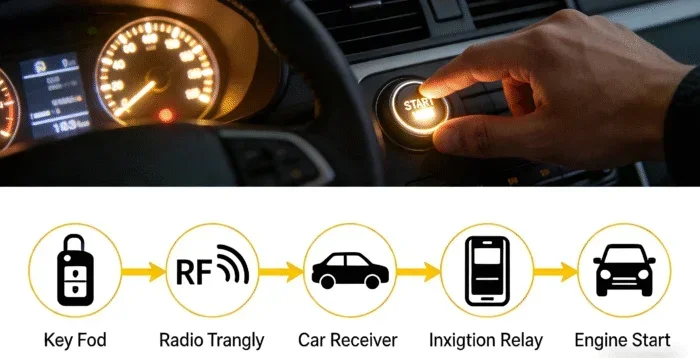
Your phone becomes a digital key. It communicates with your car using Bluetooth, Wi-Fi, or cellular data. Most systems use a combination of these connections to send commands. When you tap “start engine” in the app, the signal goes to your car’s onboard computer.
The car’s computer verifies the signal. It checks your identity through encryption and authentication. Once verified, it activates the starter motor and ignites the engine. All of this happens in seconds.
Bluetooth vs. Wi-Fi vs. Cellular Connectivity
Different systems use different connection methods:
- Bluetooth: Works within a short range, usually around 30 to 50 feet. Great for starting your car in your driveway.
- Wi-Fi: Works when your car is connected to a known Wi-Fi network. Useful at home or in a parking garage.
- Cellular Data: Works from anywhere with cell service. This is how you can start your car from the office or while traveling.
What Happens Inside the Car?
Once the app sends the start command, the car’s engine control unit (ECU) receives the signal. The ECU checks several safety conditions before allowing ignition. These include:
- Is the transmission in park or neutral?
- Are the doors locked?
- Is the brake pedal pressed?
- Is the correct authentication signal received?
Only when all conditions are met does the engine start. This layered security keeps your vehicle safe from unauthorized access.
Benefits of Starting Your Car With an App
App-based car starting offers many advantages that go beyond just convenience. Here are the biggest benefits.
1. Comfort and Convenience
This is the number one reason people love keyless ignition. In winter, you can warm up your car from the couch. In summer, you can cool it down before you get in. No more waiting in an uncomfortable car just to feel comfortable.
You can also pre-set your favorite temperature, seat position, and even radio station. When you walk to your car, everything is ready for you.
2. Enhanced Vehicle Security
Modern smart car features include advanced security measures. Many apps send you real-time alerts if someone tries to access your vehicle. You can also lock and unlock doors remotely. If your car is stolen, you can track its location using GPS.
Vehicle security is a top priority for car owners. App-based systems add layers of protection that traditional keys simply cannot match.
3. Time Savings
Think about how much time you spend looking for keys in the morning. With digital key technology, your phone is always with you. You never have to search for a key again. This small convenience adds up over months and years.
4. Better Fuel Management
Some vehicle management apps let you monitor fuel levels, engine health, and driving habits. Starting your car with an app often comes bundled with these features. You get a clearer picture of your car’s overall condition.
5. Remote Diagnostics
Many apps let you run car diagnostics remotely. You can check tire pressure, oil levels, and battery health from your phone. This helps you catch small problems before they become expensive repairs.
Popular Cars and Systems That Support App-Based Starting
Not every car supports app-based ignition out of the box. But many modern vehicles do. Here is a look at some of the most popular options.
Tesla
Tesla was one of the first automakers to fully embrace smartphone-based car control. The Tesla app lets you start your car, adjust climate settings, and even summon your vehicle in a parking lot. Tesla vehicles use a digital key stored on your phone via Bluetooth.
Ford and Lincoln
Ford’s FordPass app supports remote start, lock, and unlock features. Many Ford and Lincoln models come with built-in Wi-Fi hotspot connectivity, making app-based control seamless. The system works through Ford’s telematics platform.
BMW
BMW offers the My BMW app, which supports remote engine start, climate control, and vehicle tracking. BMW vehicles use a combination of Bluetooth and cellular connectivity for smartphone connectivity.
Hyundai and Kia
Hyundai and Kia vehicles come with the Bluelink app. It supports remote start, lock/unlock, and vehicle diagnostics. These brands have made app-based car starting standard on many of their newer models.
Chevrolet and GMC
General Motors vehicles use the myChevrolet and myGMC apps. These support remote start, climate control, and even push button start integration with your phone as a digital key.
Aftermarket Solutions for Older Cars
What if your car does not support app-based starting? You are not out of luck. Several aftermarket keyless start systems can be installed in older vehicles. Popular options include:
- Compustar – Offers remote start systems with smartphone compatibility.
- Viper – Known for reliable remote engine start modules.
- Directed Electronics – Provides app-controlled car automation kits.
These systems typically cost between $200 and $500 for installation. They are a great way to add keyless entry and app-based starting to an older car.
How to Set Up App-Based Car Starting
Setting up app-based car ignition is straightforward, but the exact steps depend on your vehicle and the system you use. Here is a general guide.
Step 1: Check Compatibility
First, check if your car supports smartphone-based starting. Look in your owner’s manual or visit the manufacturer’s website. Most cars made after 2018 have some form of connected car technology.
Step 2: Download the Right App
Download the official app from your car’s manufacturer. For example, Tesla owners use the Tesla app, Ford owners use FordPass, and BMW owners use My BMW. Make sure your phone is compatible. Most apps work with both iOS and Android.
Step 3: Pair Your Phone With the Car
Follow the app instructions to pair your phone with your vehicle. This usually involves:
- Creating an account with the manufacturer
- Linking your vehicle identification number (VIN)
- Connecting via Bluetooth or Wi-Fi
- Setting up authentication and security features
Step 4: Test the System
Before relying on the app daily, test it in a safe environment. Try starting the engine, locking the doors, and adjusting the climate. Make sure everything works as expected.
Quick Tip: Always keep your phone charged. A dead phone means you cannot use app-based car starting. Consider carrying a portable charger if you rely heavily on this feature.
Common Setup Mistakes to Avoid
Here are some mistakes people make when setting up keyless ignition systems:
- Skipping firmware updates: Always update your car’s software and the app to the latest version.
- Ignoring security settings: Enable two-factor authentication and strong passwords.
- Not testing the range: Know how far away your phone can be when sending start commands.
- Forgetting backup methods: Keep a physical key or key fob as a backup in case the app fails.
Is App-Based Car Starting Safe and Secure?
Security is a major concern when it comes to digital car keys. After all, you are putting a lot of trust in a smartphone app to control your vehicle. The good news is that most modern systems are very secure.
Encryption and Authentication
Reputable manufacturers use advanced encryption to protect the communication between your phone and your car. The signals are encrypted, making it very difficult for hackers to intercept or replicate them. Most apps also require multi-factor authentication, such as a password and a fingerprint scan.
GPS Tracking and Remote Lock
If someone does gain unauthorized access, most systems allow you to remotely lock your car and track its location via GPS. Some systems can even disable the engine remotely. These features add a strong layer of vehicle security.
Are There Risks?
Like any connected technology, there are some risks. Relay attacks, where hackers amplify your phone’s Bluetooth signal to unlock your car, are a known concern. However, manufacturers are constantly updating their systems to counter these threats. Using strong passwords and keeping your app updated significantly reduces your risk.
Expert Insight: “The safest approach is to use a combination of app-based control and a physical backup key,” says automotive technology expert Mark Dawson. “Never rely solely on your phone. Keep a traditional key fob or physical key in a safe place as a backup.”
Future of Car Starting: Where Is This Technology Heading?
Automotive technology is evolving rapidly. The future of car automation and vehicle connectivity looks incredibly promising. Here are some trends to watch.
Digital Keys Using NFC and UWB
Near Field Communication (NFC) and Ultra-Wideband (UWB) are the next generation of digital key technology. These allow your phone to act as a key that you can tap against the car door to unlock and start it. UWB offers precise location tracking, so your car knows exactly where you are.
Integration With Smart Homes
Imagine your car communicating with your smart home. You pull into the driveway, and your garage opens, lights turn on, and the thermostat adjusts. Connected car technology is moving toward seamless integration with our daily lives.
Voice-Controlled Ignition
Voice assistants like Alexa, Google Assistant, and Siri are becoming part of car automation. Soon, you may be able to say “Start my car” and have it ignite without touching your phone or key at all.
Biometric Car Starting
Some luxury brands are experimenting with biometric authentication for car starting. Fingerprint scanners and facial recognition could replace both keys and phone apps. Your face becomes the key.
The possibilities are exciting. Starting your car with an app instead of a key is just the beginning of a much larger transformation in how we interact with our vehicles.
Common Mistakes People Make With App-Based Car Starting
Even though keyless ignition is user-friendly, some common mistakes can cause frustration or security issues.
- Not updating the app regularly: Updates often include security patches and bug fixes. Skipping them leaves your system vulnerable.
- Using public Wi-Fi to control your car: Always use your cellular data or a trusted Wi-Fi network. Public Wi-Fi can be a security risk.
- Ignoring battery levels: Both your phone battery and your car battery matter. A weak car battery can prevent app-based starting from working.
- Sharing app access carelessly: Only share your digital key with trusted family members. Do not share login credentials with strangers.
- Assuming the app works everywhere: Some features require cellular coverage. If you are in a dead zone, certain commands may not go through.
Avoiding these mistakes ensures a smooth and secure experience with your app-controlled vehicle.
How App-Based Starting Compares to Traditional Keys
Let us look at a quick comparison between app-based car starting and traditional keys.
| Feature | Traditional Key | App-Based Starting |
|---|---|---|
| Convenience | Moderate | Very High |
| Remote Start Range | Limited to handheld remote | Unlimited with cellular data |
| Security Features | Basic | Advanced encryption and tracking |
| Setup Complexity | None | Simple, takes 10-15 minutes |
| Cost | Included with car | Free with new cars; $200-$500 for aftermarket |
| Dependency on Phone Battery | None | Yes, phone must be charged |
| Smart Home Integration | Not possible | Yes, with compatible systems |
As you can see, app-based vehicle ignition offers significant advantages over traditional keys. The main trade-off is the dependency on your phone battery and internet connection.
Frequently Asked Questions
Can I start my car with an app if I do not have a smartphone?
No, app-based car starting requires a compatible smartphone. You need either an iPhone or an Android device with the manufacturer’s app installed. If you do not have a smartphone, a traditional key or key fob is still your best option.
Is remote start through an app bad for my car’s engine?
No, remote engine start through an app is designed to be safe. Modern systems limit idle time and monitor engine conditions. Your car will not be damaged by normal app-based starting. Always follow your manufacturer’s guidelines for best practices.
Can someone hack my car if I use an app to start it?
The risk is very low with reputable manufacturers. These systems use advanced encryption and multi-factor authentication. To stay safe, keep your app updated, use strong passwords, and avoid using public Wi-Fi for car controls.
Do I need a special plan or subscription to use app-based car starting?
Some manufacturers require a connected car subscription for full app access. For example, BMW and Hyundai may offer free trials that later require a monthly fee. Check with your car’s manufacturer to understand any ongoing costs.
What happens if my phone dies and I need to start my car?
Most keyless entry systems include a backup method. You can still use a physical key or key fob to start your car. Always keep a backup key accessible in case of emergencies.
Can I install app-based starting in an older car?
Yes, aftermarket keyless start systems are available for older vehicles. Brands like Compustar and Viper offer kits that add smartphone connectivity to cars that did not come with it originally. Installation costs typically range from $200 to $500.
=== CONCLUSION ===
Starting your car with an app instead of a traditional key is more than a cool tech feature. It is a practical upgrade that saves time, improves comfort, and enhances vehicle security. Whether you drive a new Tesla, a Ford with FordPass, or an older car with an aftermarket system, keyless app-based car starting is within reach.
The technology is safe, the setup is simple, and the benefits are real. From pre-conditioning your car in extreme weather to tracking your vehicle’s health remotely, app-based vehicle ignition makes life easier every single day. As connected car technology continues to evolve, we can expect even more amazing features in the near future.
If you have not yet tried starting your car with an app, now is a great time to explore your options. Check your car’s manual, download the right app, and experience the future of automotive technology today. Your mornings will never feel the same again.