Does the Dodge Charger Have Apple CarPlay Right Now
Yes, the Dodge Charger does have Apple CarPlay, but it depends on the model year and trim level. Newer Charger models from 2022 onward come standard with wireless Apple CarPlay, while older trims may need a wired connection. In this guide, we break down everything you need to know about Dodge Charger Apple CarPlay compatibility, setup, and features.
Key Takeaways
- Apple CarPlay is available on most Dodge Charger models, especially newer ones from 2021 and up.
- Wireless Apple CarPlay comes standard on higher trims and recent model years.
- Older Charger models may only support wired CarPlay through a USB connection.
- Setting up CarPlay is simple and takes less than a minute once your phone is paired.
- Not all trims are equal — SRT and R/T models tend to have the best infotainment tech.
- Troubleshooting tips can fix most common CarPlay connection issues fast.
- Aftermarket adapters are an option if your Charger lacks native CarPlay support.
📑 Table of Contents
- Does the Dodge Charger Have Apple CarPlay?
- Which Dodge Charger Model Years Support Apple CarPlay?
- How to Set Up Apple CarPlay on Your Dodge Charger
- Wireless vs Wired Apple CarPlay on the Dodge Charger
- Apple CarPlay Features You Get on the Dodge Charger
- Troubleshooting Apple CarPlay on Your Dodge Charger
- Can You Add Apple CarPlay to Older Dodge Chargers?
- Final Thoughts on Dodge Charger Apple CarPlay
Does the Dodge Charger Have Apple CarPlay?
The short answer is yes. The Dodge Charger supports Apple CarPlay, but the details depend on the model year and trim you own. If you are a Charger owner or thinking about buying one, you probably want to know exactly what you get. This guide covers everything from basic compatibility to setup tips and common problems.
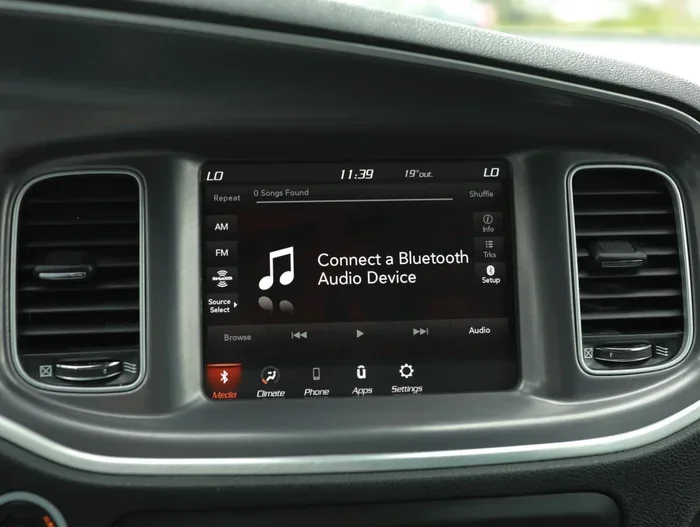
Apple CarPlay lets you mirror your iPhone on the car’s touchscreen. You get access to maps, music, messages, and more without taking your eyes off the road. For Dodge Charger drivers, this means you can stay connected while enjoying that iconic muscle car feel. Dodge Charger Apple CarPlay support has improved a lot over the years, especially in the latest generation.
Whether you drive a 2015 Charger or a brand-new 2024 model, there is a good chance CarPlay is in the picture. Let us break down exactly which years and trims get it, and how to make the most of it.
Which Dodge Charger Model Years Support Apple CarPlay?
Not every Dodge Charger comes with Apple CarPlay out of the box. The feature rolled out across different model years, and trim levels play a big role. Here is a simple breakdown.
2015 to 2020 Chargers
Most Chargers from this era include Apple CarPlay, but usually only with a wired USB connection. The Uconnect infotainment system in these models supports CarPlay, but you will need to plug in your iPhone. Wireless CarPlay was not standard in this range.
2021 to 2023 Chargers
This is when things got better. The 2021 and newer Dodge Chargers started offering wireless Apple CarPlay on higher trims. The Uconnect 5 system brought faster performance and smoother integration. If you have a Charger SRT or R/T from this period, you likely have wireless CarPlay ready to go.
2024 and Newer Chargers
The latest Dodge Charger models come with full Apple CarPlay support as standard. Wireless connectivity is now expected, and the infotainment system is more intuitive than ever. Dodge has kept up with the demand for seamless smartphone integration.
For a quick comparison of Apple CarPlay availability across brands, you can check how Apple CarPlay works on the Alfa Romeo Giulia for a similar luxury-leaning experience.
How to Set Up Apple CarPlay on Your Dodge Charger
Setting up Dodge Charger Apple CarPlay is straightforward. Whether you use a wired or wireless connection, the process is quick and user-friendly.
Wired Setup
If your Charger uses a wired connection, follow these steps:
- Plug your iPhone into the USB port in the center console.
- Wait for the CarPlay icon to appear on the touchscreen.
- Tap the icon and follow the on-screen prompts.
- Grant permissions for notifications, maps, and Siri.
Make sure you use a certified USB cable. Cheap cables can cause connection drops or slow data transfer. A good cable makes a big difference in how smoothly CarPlay runs.
Wireless Setup
For wireless Apple CarPlay, the process is even simpler:
- Make sure Bluetooth and Wi-Fi are turned on your iPhone.
- Go to your Charger’s infotainment settings.
- Select Apple CarPlay and choose wireless.
- Your phone will pair automatically.
Once paired, your Charger will connect to CarPlay every time you get in the car. No cables needed. If you want to learn more about wireless CarPlay in general, you can read about how to use Apple CarPlay wirelessly for a deeper dive into the technology.
Quick Tips for a Smooth Setup
- Restart your iPhone before connecting if CarPlay does not appear right away.
- Update iOS to the latest version for the best compatibility.
- Clean the USB port in your Charger if you use a wired connection.
- Disable VPN apps on your phone, as they can interfere with CarPlay.
Wireless vs Wired Apple CarPlay on the Dodge Charger
Both wireless and wired Apple CarPlay work on the Dodge Charger, but they have some key differences. Here is a side-by-side look.
| Feature | Wired CarPlay | Wireless CarPlay |
|---|---|---|
| Connection Type | USB cable | Bluetooth and Wi-Fi |
| Setup Speed | Fast (plug and go) | Fast (auto-pair) |
| Cable Needed | Yes | No |
| Connection Stability | Very stable | Stable (occasional drops) |
| Available on Older Models | Yes (2015+) | No (2021+ on higher trims) |
| Charging While Connected | Yes | No (unless using a wireless charger) |
Most Dodge Charger owners prefer wireless CarPlay for the convenience. You do not have to dig for a cable every time you get in the car. However, wired connections are more reliable for those who want zero interruptions. If your Charger does not have native wireless CarPlay, you can still connect your iPhone to CarPlay wirelessly using an aftermarket adapter.
Apple CarPlay Features You Get on the Dodge Charger
Once Apple CarPlay is running on your Dodge Charger, you get a solid set of features. Here is what you can expect.
Navigation
Apple Maps, Google Maps, and Waze all work with CarPlay. You get turn-by-turn directions right on the Charger’s big touchscreen. This is one of the most used CarPlay features for daily commuters and road trippers alike.
Music and Podcasts
Spotify, Apple Music, Pandora, and YouTube Music all work through CarPlay. You can control playback from the dashboard or use Siri voice commands. Switching between songs or podcasts is easy and keeps your hands on the wheel.
Messaging and Calls
CarPlay lets you send and receive messages using Siri. You can hear incoming texts read aloud and reply by voice. Phone calls are handled through the car’s microphone and speakers, making driving safer.
Siri Integration
Siri is deeply built into CarPlay. You can ask Siri to find a gas station, play a playlist, or send a text. Just hold the CarPlay button on your touchscreen or steering wheel and speak.
For those who like to customize their CarPlay experience, you can add more apps to CarPlay and organize your home screen layout for faster access.
Expert Insight
Dodge designed the Charger’s infotainment system with both performance and convenience in mind. The Uconnect system pairs well with Apple CarPlay, offering responsive touch responses and clear display quality. Experts note that the latest Uconnect 5 system in 2022+ Chargers is one of the smoothest in the muscle car segment.
Troubleshooting Apple CarPlay on Your Dodge Charger
Even with a great system, Apple CarPlay can sometimes act up. Here are the most common issues Dodge Charger owners face and how to fix them.
CarPlay Does Not Appear on the Screen
This is the most common complaint. Try these steps first:
- Unplug and replug your USB cable if using a wired connection.
- Turn Bluetooth off and back on your iPhone.
- Restart your iPhone completely.
- Check that CarPlay is enabled in iPhone settings under General.
Connection Drops Frequently
Wireless CarPlay can sometimes disconnect. This often happens if:
- Your phone’s Wi-Fi or Bluetooth settings need a refresh.
- Another device is interfering with the connection.
- The infotainment system needs a software update.
Restarting both your phone and the car’s infotainment system usually fixes this fast.
Audio or Maps Do Not Work Properly
If sound cuts out or maps freeze, try clearing the CarPlay app cache on your iPhone. Also check that your phone is not in Low Power Mode, as this can limit CarPlay performance.
Common Mistakes to Avoid
- Using cheap USB cables. They cause connection issues more often than you think.
- Ignoring software updates. Both iOS and Uconnect need to stay current.
- Overloading CarPlay with too many apps. Keep your home screen clean for better performance.
Can You Add Apple CarPlay to Older Dodge Chargers?
If your Dodge Charger predates Apple CarPlay support, you are not out of luck. Aftermarket solutions exist that can bring Apple CarPlay to older models.
Several companies make CarPlay adapters that plug into your Charger’s existing infotainment system. These adapters add wireless or wired CarPlay support without needing a full system replacement. They range in price from around $50 to $300 depending on features.
Some owners choose to upgrade the entire infotainment unit. This gives you not only CarPlay but also modern features like backup cameras, Apple CarPlay wireless, and better sound quality. It is a bigger investment but can really transform an older Charger.
Before buying any adapter, make sure it is compatible with your specific Charger model year and Uconnect version. Not all adapters work with all systems.
Final Thoughts on Dodge Charger Apple CarPlay
The Dodge Charger is a powerful, stylish muscle car, and Apple CarPlay adds a modern tech layer that makes it even more enjoyable to drive. Whether you have a wired or wireless setup, CarPlay keeps you connected, entertained, and导航-ready without distractions.
If you own a newer Charger, you likely have wireless CarPlay already. If you have an older model, a simple USB cable or aftermarket adapter gets the job done. The feature set is rich, the setup is easy, and the overall experience is smooth.
Just remember to keep your software updated, use quality cables, and take advantage of Siri for hands-free control. With Apple CarPlay, your Dodge Charger becomes more than just a muscle car. It becomes a smart, connected driving machine.