Does Your Car Need to Be On to Program Your HomeLink
You do not always need to have your car running to program HomeLink. Most vehicles let you program HomeLink with the ignition in the accessory or on position, while the engine is off. Some older models may require the engine to be running during the training process. Knowing the right position for your ignition and following the correct steps ensures a smooth setup every time.
HomeLink is one of the most convenient features you will ever find in your car. It lets you open your garage door with a single button press. No more fumbling for a remote control. No more leaving the car to walk to the garage. But when you first try to set it up, a common question pops up. Does your car need to be on to program your HomeLink? The short answer is usually no, but the full answer depends on your vehicle, its age, and the model year. Let us walk through everything you need to know so you can get your HomeLink working without any headaches.
Programming HomeLink is not complicated, but it does require a few minutes of your time and the right conditions. Some people assume they need to leave the engine running the whole time. Others think the car needs to be completely off. The truth sits somewhere in the middle. Most modern vehicles let you program HomeLink with the ignition turned on but the engine off. This is called the accessory or on position. It gives the HomeLink module enough power to learn the signal from your garage door opener without draining your battery or wasting fuel.
If you have ever wondered about the connection between your car’s electrical system and its accessories, you are not alone. The way your car powers different features is fascinating. For instance, did you know that some systems work even when the engine is completely off? Understanding how HomeLink programming fits into your car’s broader electrical setup makes the whole process much less intimidating. This guide covers every angle, from basic steps to troubleshooting, so you walk away feeling confident.
Key Takeaways
- Car ignition position matters: You typically need the key in the on or accessory position, but the engine does not need to be running.
- HomeLink works with most garage door openers: The system is compatible with a wide range of brands and models.
- Programming steps vary by car brand: Always check your owner’s manual for brand-specific instructions.
- Common issues are easy to fix: Signal interference and dead batteries cause most HomeLink problems.
- You can reset HomeLink if needed: A simple reset clears old codes and lets you start fresh.
- Adding accessories like blind spot monitoring follows similar logic: Can you add blind spot monitoring to my car? shares the same principle of working with your car’s electrical system.
📑 Table of Contents
What Is HomeLink and How Does It Work?
HomeLink is a built-in wireless control system found in many vehicles. It was originally designed to replace the handheld remote you hang from your rearview mirror. The system uses radio frequency to communicate with your garage door opener, gate operator, or even some home automation devices. Once programmed, you can open and close your garage with the push of a button right from your driver’s seat.
The HomeLink system works by learning the signal that your existing garage door remote sends out. It stores that signal in its memory. Then, when you press the HomeLink button in your car, it sends out the same signal. Your garage door opener receives it and responds. This process is called signal training or cloning. It is fast, secure, and works with most major garage door brands.
HomeLink has been around since the 1990s. Over the years, the technology has improved. Newer versions support rolling code security, which changes the access code every time you use it. This adds an extra layer of protection for your home. Whether you drive a sedan, SUV, or truck, there is a good chance your vehicle has HomeLink built in. Check your console or overhead console for the three small buttons labeled HomeLink.
Does Your Car Need to Be On to Program HomeLink?
This is the big question, and the answer is more nuanced than you might think. The short answer is that your car needs to be in the on or accessory position, but the engine does not need to be running. Let us break this down into different scenarios so you know exactly what to do.
When the Ignition Is Off Completely
If your car is completely off and the key is removed or the push-button start is in the off position, HomeLink will not work. The system needs power from the car’s electrical system to train the signal. Without that power, the HomeLink module stays dormant. You cannot program or reset HomeLink in this state. So before you begin, make sure you have the ignition turned to at least the accessory position.
Think of it like trying to charge your phone with the charger plugged into a dead outlet. It simply will not work. Your car’s electrical system is the outlet, and HomeLink is the phone. You need that power flowing for anything to happen.
When the Ignition Is On but the Engine Is Off
This is the sweet spot for most HomeLink programming. Turn your key to the on position or push the start button without pressing the brake pedal. The dashboard lights will come on. The radio will work. The engine stays off. In this state, the HomeLink module receives enough electrical power to learn new signals.
Most car manufacturers recommend this method. It saves fuel, prevents engine wear, and keeps things simple. You can sit in your parked car in the driveway and program all three HomeLink buttons in about ten minutes. This is the method you will find in most owner’s manuals for vehicles like Ford, Toyota, Honda, and Chevrolet.
When the Engine Is Running
Some older vehicles or specific models may require the engine to be running during programming. This is less common in modern cars but still worth mentioning. If your owner’s manual says to keep the engine running, follow that instruction. The engine provides a stable power supply that prevents voltage drops, which could interrupt the programming process.
However, running the engine in an enclosed space like a garage is dangerous due to carbon monoxide. Always park outside and open the garage door before starting the engine. Safety first, always. If you are unsure whether your car needs the engine running, check the manual or consult a dealer. Do not guess.
Step-by-Step Guide to Programming HomeLink
Now that you know the answer to the big question, let us get into the actual steps. Programming HomeLink is straightforward once you know what to do. Follow these steps carefully and you will have your garage door opener connected in no time.
Preparation Before You Start
Before you touch any buttons, a little preparation goes a long way. Here is what you need to have ready:
- Your garage door remote: Make sure the battery is fresh. A weak battery can cause signal problems during training.
- Your car keys: You need access to the ignition.
- A stable parking position: Park in front of the garage door, about five feet away. This ensures a strong signal during the learning process.
- Your owner’s manual: Some brands have slightly different steps. Having the manual handy prevents confusion.
- Patience: The process takes about five to ten minutes. Do not rush it.
Also, make sure no one is using the garage door remote while you are programming. If someone else presses their remote during training, it can interfere with the process and force you to start over. Ask everyone in the household to stay clear until you are done.
Programming HomeLink with the Car On
Here is the standard method that works for most vehicles. Follow these steps carefully:
- Turn the ignition to the on position. The engine stays off. The dashboard should light up.
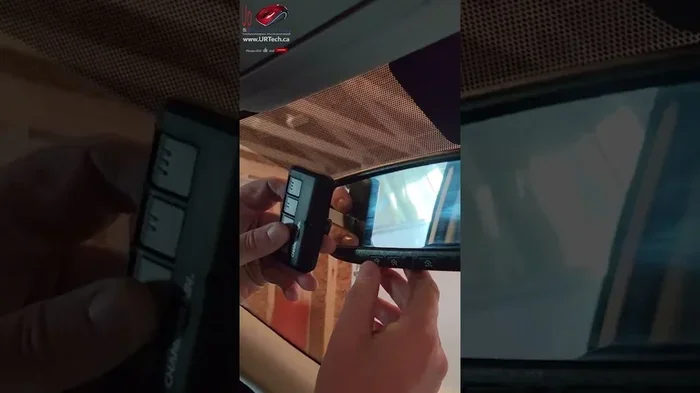
- Locate the HomeLink buttons. They are usually on the console near the rearview mirror or on the overhead console.
- Press and hold the HomeLink button you want to program. Hold it for about 20 seconds until the indicator light starts blinking.
- Release the button. The light will continue blinking.
- Hold your garage door remote near the HomeLink system. About one to two inches away works best.
- Press and hold the garage door remote button. The HomeLink indicator light should change from slow blinking to fast blinking. This means it has learned the signal.
- Release both buttons. Press the HomeLink button to test. Your garage door should respond.
That is it. The whole process takes about five minutes per button. If the light does not change to fast blinking, repeat the process. Sometimes it takes a second attempt for the signal to register clearly.
Programming HomeLink with the Car Off
Some vehicles allow you to program HomeLink with the ignition off, as long as the doors are unlocked. However, this method is less common. If your car supports it, the steps are similar but you may need to cycle the ignition on and off during the process. Again, always refer to your owner’s manual for the exact method your vehicle requires.
Common HomeLink Programming Problems and How to Fix Them
Even when you follow the steps perfectly, things can go wrong. HomeLink programming is not always smooth the first time. Here are the most common problems and how to solve them.
Why Your HomeLink Won’t Learn the Signal
If the HomeLink indicator light stays slow or does not change at all, the system is not picking up the garage door remote signal. This can happen for several reasons:
- Weak battery in the garage door remote: Replace the battery and try again.
- Too much distance: Hold the remote closer to the HomeLink unit.
- Signal interference: Other electronic devices nearby can disrupt the signal. Move phones, tablets, and other remotes away from the console.
- Wrong frequency: Some garage door openers operate on frequencies that older HomeLink systems cannot read. In this case, you may need a HomeLink universal remote or a frequency converter.
What to Do When the Car Dies Mid-Programming
If your car battery dies or you accidentally turn the ignition off during programming, do not panic. You simply start over from the beginning. A car dying during programming is not uncommon, especially if the battery is old or weak. If this keeps happening, it might be time to replace the car battery. Check your battery health if you notice dimming lights or slow cranking when starting the car.
Interestingly, a dead car battery can cause all sorts of issues beyond HomeLink problems. If you have ever experienced your car not starting right after turning off, a weak battery might be the culprit. Keeping your battery in good shape solves many electrical gremlins in your vehicle.
HomeLink Button Not Responding After Programming
If the HomeLink button was programmed successfully but does not respond when pressed, try these steps:
- Check that the garage door opener is powered on.
- Make sure no lockout mode is active on the garage door opener.
- Reprogram the HomeLink button using the steps above.
- If the problem persists, reset the HomeLink system by holding the two outer buttons for 10 seconds until the indicator light turns off.
HomeLink Compatibility Across Different Car Brands
HomeLink is a universal system, but the programming process can vary slightly between car brands. Here is a quick look at how some major manufacturers handle HomeLink programming.
| Brand | Ignition Position Needed | Engine Running? | Special Notes |
|---|---|---|---|
| Toyota | On or accessory | No | Hold HomeLink button for 20 seconds |
| Ford | Accessory or on | No | Some models need ignition cycle |
| Honda | On position | No | Works with most aftermarket openers |
| Chevrolet | Accessory or on | No | Three buttons allow multiple garage doors |
| BMW | On position | No | Check for iDrive integration options |
As you can see, the process is very similar across brands. The main difference is the exact ignition position and button hold times. Always consult your owner’s manual for the specific instructions for your vehicle model and year. If you have lost your manual, you can usually find a digital copy on the manufacturer’s website.
Some newer vehicles come with integrated systems that go beyond basic HomeLink. For example, some BMW models offer additional driver assistance features that can be added after purchase. While HomeLink is a standard convenience feature, the broader world of car accessories and add-ons is vast. Understanding how your car’s electrical system powers all these features helps you make smarter decisions about upgrades and maintenance.
Maintaining Your HomeLink System
Once your HomeLink is programmed, you want it to keep working reliably. Maintenance is minimal, but a few simple habits go a long way.
- Keep the HomeLink unit clean: Dust and debris can build up around the buttons and the antenna. Wipe it down occasionally with a dry cloth.
- Replace the car battery when needed: A weak car battery can affect the HomeLink system’s performance. If you notice your HomeLink acting up, check your battery first.
- Reprogram after a battery disconnect: If you ever disconnect your car battery for any reason, you will need to reprogram HomeLink. The system loses its stored signals when power is cut.
- Update if needed: Some newer vehicles allow HomeLink firmware updates through the dealer or a compatible app. Check with your dealer if you are unsure.
Taking care of your HomeLink system is easy and takes almost no time. A little attention every few months keeps everything working smoothly. And just like with any car feature, understanding how it works helps you troubleshoot faster when something goes wrong.
Final Thoughts
Your car does not need to be running to program HomeLink. In most cases, you just need the ignition in the on or accessory position with the engine off. This simple fact makes the programming process easy, safe, and convenient. You can do it in your driveway without wasting fuel or risking safety.
Follow the steps in this guide, and you will have your garage door opener connected to your HomeLink system in under ten minutes. If you run into issues, check the battery, reduce signal interference, and try again. The system is designed to be user-friendly, and once it is set up, you will wonder how you ever lived without it.
HomeLink is one of those small car features that makes a huge difference in your daily routine. It is worth taking the time to set it up properly. And now that you know the answer to the big question, you are well on your way to a more convenient driving experience.
Frequently Asked Questions
Can I program HomeLink if my car is completely turned off?
No, you cannot. The HomeLink system needs electrical power from the ignition to train a new signal. You must turn the key to the on position or push the start button to the accessory or on setting. The engine itself does not need to be running, but the ignition must be on.
How long does it take to program HomeLink?
Most people complete the process in about five to ten minutes per button. If you are programming all three HomeLink buttons, plan for around 20 to 30 minutes total. The process is quick and straightforward once you know the steps.
Can I program HomeLink without the original garage door remote?
It depends on your garage door opener model. Some systems allow you to program HomeLink directly through the garage door motor unit without using a remote. However, having the original remote makes the process much easier and more reliable. Check your garage door opener manual for alternative methods.
Why does my HomeLink stop working after a few months?
The most common reason is a weak car battery. When the battery voltage drops, the HomeLink system may lose its stored signals or fail to pick up new ones. Replacing the car battery usually fixes the problem. Signal interference from new electronic devices in your car can also cause issues.
Is HomeLink the same as a universal garage door remote?
Not exactly. HomeLink is a built-in system in your car that learns the signal from your existing garage door remote. A universal remote is a separate device that you mount in your car and program to work with multiple devices. Some newer vehicles offer both HomeLink and a built-in universal remote function.
Can I use HomeLink for anything besides a garage door?
Yes. HomeLink can control gate operators, carports, and some home automation systems like lighting and security systems. Check your HomeLink user guide for a list of compatible devices. The system is versatile and works with many types of wireless operators beyond just garage doors.